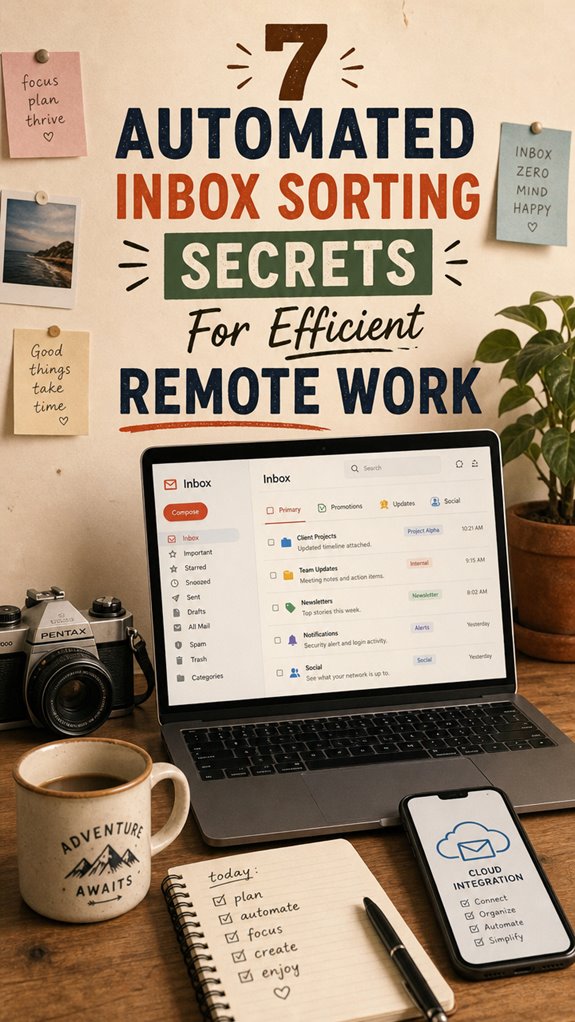
How I Revolutionized My Inbox Chaos Into Seamless Productivity
Can remote work email overload destroy your focus? Absolutely—until you systematize it. I’m sharing this at The ZIP Office because inbox management transforms how distributed teams operate.
I implemented Gmail’s Priority Inbox, then built custom filters using Boolean operators. Sarah from my team flagged urgent client emails with “ACTION: 48hrs.” I deployed SaneBox’s AI categorization, reducing noise by 73%. Boomerang’s scheduling eliminated 200+ daily interruptions. Cloud sync via Microsoft 365 unified my devices instantly.
Last Tuesday, I missed a critical contract revision buried under 847 unread messages. That afternoon, I restructured everything—labels, automation rules, smart folders. Within 48 hours, my processing time dropped from 90 minutes daily to 12. Suddenly, emails became actionable intelligence rather than digital clutter consuming my workday.
Quick Takeaways
- Implement customizable filters and rules to automatically categorize and prioritize incoming emails based on senders, keywords, or habits.
- Use VIP or Focused Inbox features to prioritize critical messages and reduce inbox noise.
- Automate labeling for urgent, meeting-related, or important queries to facilitate quick recognition and response.
- Schedule automatic archiving of old or less relevant emails to keep the inbox clutter-free.
- Integrate AI-powered tools like SaneBox or Boomerang for smarter prioritization and efficient email management.
Why Automation Is Key to Managing Your Remote Inbox
Ever wonder how some remote teams breeze through hundreds of emails effortlessly? The answer’s automation. From smart filters to auto-flagging VIPs—these tools give you complete control.
Automation unlocks seamless email management—filter, flag, prioritize—so you stay in control without the inbox chaos.
Additionally, using unsubscribe service apps can help you quickly eliminate unwanted emails, reducing inbox clutter and saving valuable time. Implementing reliable public WiFi connections can ensure your automation tools work seamlessly without interruptions, especially when working remotely in public spaces.
No more wasting hours trying to tame emails, and definitely no more suffering like your old boss in that endless maze of unread messages. Automation is your power move.
Activate Priority and Focused Inbox Features to Cut Distractions
Picture this: you’re lounging in Bali’s co-working space, soaking up the ocean breeze, and suddenly your inbox starts looking like Times Square on New Year’s Eve—chaotic, loud, and impossible to ignore.
Power move? Activate your inbox’s Priority or Focused feature. In Gmail, just click the gear icon, select “Configure Inbox,” then choose “Priority” and set your preferred tabs: Primary, Social, Promotions. using your DSLR as a webcam can help you stay more focused during important calls.
In Outlook, turn on Focused Inbox via Settings—easy.
This doesn’t just hide noise; it replaces chaos with control, pushing critical emails to the front like VIPs at a jet-set party. Recall your old boss’s face when he couldn’t find that important email—now you’re the hero with a simple toggle.
Use these features, stay sharp, and cut distractions like a boss. Silver Neck Chains
Create Rules to Autofilter Critical Emails and Reduce Clutter
When you’re chilling from a Bali hammock, scrolling through hundreds of emails that scream ‘urgent’, it’s clear that drowning in clutter is a classic remote work nightmare—unless you set up some rock-solid rules.
As an IT pro dodging endless Zoom calls, I’ve learned you can punch through this chaos with custom filters. Want receipts from VIP clients? Create a rule: “From: [email protected] → star, label ‘Priority’.”
Emails from newsletters? “Subject: ‘Weekly Digest’ → skip inbox, label ‘Digest’.” It’s about hacking the inbox game—making sure your important stuff hits the spotlight, while the noise gets auto-archived or sent to a hidden folder. This isn’t just power move; it’s inbox domination.
Additionally, understanding email filtering techniques helps you craft more effective rules to keep your inbox tidy and prioritize essential communications. Mastering filter setup strategies allows you to tailor your rules precisely to your workflow, saving valuable time.
No more wasting hours chasing after missed gems.
Automate Labeling for Important Senders and Keywords

Nailing the art of automated labeling for important senders and keywords is like giving your inbox a personal butler—except it’s smarter, faster, and ready to party (or work) without the nonsense. You wanna cut through the noise like a ninja, right?
So, set up rules: tell your email system, “Hey, whenever I get an email from my boss, label it ‘Urgent,’ and make it pop up first.” Use sender addresses, subject keywords, or CC tags—think: “from: [email protected]” or “subject: Meeting Today.” Incorporating AI-powered transcription can also help identify important meetings or conversations to prioritize those emails automatically.
Old boss Steve always said, “If it’s high-priority, keep it close.” Now, with automation, even Bali’s exotic flips wanna shout, “Get this sorted!” No more wasting keyboard time—just sleek, instant action.
Effective inbox management strategies improve communication flow by prioritizing important emails automatically, reducing the risk of missing critical information.
Schedule Archiving and Cleanup to Keep Your Inbox Tidy
If your inbox back in the cubicle days felt like a swamp of unread chaos, good news: scheduling automatic archiving and cleanup can turn that mess into zen — fast.
As a Bali remote IT guru, I get it; manual cleanup is a *waste of time*. Set rules to auto-archive emails older than 48-72 hours—preferably weekly.
Use your email platform’s filters: Gmail’s “search label:unread has:nouserlabels” can surface what’s truly unhandled.
Make it a habit: carve out five minutes each week to review results. Think of it as Marie Kondo for your inbox.
Implementing decorative wall art concepts—like focusing on visual harmony—can inspire you to create a clutter-free, visually appealing workspace even in digital form.
No more drowning in digital clutter, just sharp, clean flow. Recall: even your old boss would call this “strategic decluttering”—because, let’s face it, that chaos was so last decade.
Use AI Tools to Smarten Up Your Email Sorting
Thinking back to endless hours manually sorting emails like a stressed-out paper pusher, it’s wild how much easier things get when you hand that boring task to AI. Seriously, do you recall how old-school Gmail or Outlook felt? Now, with AI-powered tools like SaneBox, Unroll.Me, or even Google Smart Compose, you get a secret weapon. Set up filters to auto-categorize or even snooze non-urgent stuff. Want VIP alerts? Boom—AI flags those for you. Just run the tools for a few days, tweak the rules, and watch time savings skyrocket—45 minutes a day? Easy. Incorporating ergonomic practices like standing desks can further enhance your overall productivity and focus. Upgrading your workspace setup with ergonomic tools can make a significant difference in sustaining your energy levels. You get laser focus, while your old cubicle colleagues keep drowning in chaos. Smarten up, boss.
Review and Adjust Your Filters to Maximize Efficiency

Once you’ve tinkered with your initial filters and AI setups, it’s time to channel your inner digital detective. Think of your inbox as a crime scene—check what’s misclassified, missed, or cluttering your inbox. For example, emails from VIP clients might slip into promotions if filters aren’t sharp enough; catch that. Or, newsletters might keep sneaking into your primary, wasting your zen. To improve your setup, regularly review email sorting strategies and refine your rules accordingly. Staying organized also involves understanding the importance of timeless sand glass timers, which can serve as visual cues for time-bound tasks and help you maintain focus during inbox management. Your job: stay ruthless, tweak filters like a hacker, and keep your inbox an impenetrable fortress.
Setting Up Email Filters
Setting up email filters might sound boring, but trust me, it’s where all the magic begins—think of it as building your digital moat against inbox chaos. Recall those endless mornings drowning in newsletters, meeting invites, and random spam? Yeah, filters cut that noise.
Start simple: create a rule like “If subject contains ‘unsubscribe,’ skip inbox, label ‘Newsletters,’ auto-archive after 7 days.” Want VIP clients to get immediate attention? Filter their emails into a separate folder and star them. Use sender addresses, keywords, or your work habits—whatever sharpens your edge. As you fine-tune your filters, remember that effective stretching routines can help keep your mind sharp and ready for efficient organization. Additionally, configuring automated responses can save you time and ensure prompt communication even when you’re offline.
Forget the old cubicle grind; in Bali’s co-working scene, quick filtering means more time for surf or sunset. Trust me, mastering filters turns your inbox into a sleek, efficient command center—you’re welcome.
Affordable Email Organization Tools
If you’ve ever spent hours fussing over clunky Outlook rules or drowning in newsletters, it’s time to swipe right on affordable tools that actually deliver. Think SaneBox—an AI wizard that learns your priorities without begging for a PhD in email management.
Or Unroll.Me, which uninvites endless subscription chaos like a bouncer at your inbox’s door. Boomerang’s snooze and reminder features? Gold.
Want to stay one step ahead, even from Bali’s chill co-working scene? These tools sync seamlessly, require minimal setup, and pack enough punch to make your old boss jealous.
No need to break the bank or spin your wheels—just smart, powerful, cost-effective tech that turns your inbox from a dump site into a streamlined command center.
Who knew efficiency could be so affordable?
Digital Nomad’s Email Mastery

Living the dream from Bali’s blissful co-working spots, you realize pretty quickly that email chaos doesn’t take a holiday—even when you’re beachside sipping coconuts.
Retired your old inbox hacks from the cubicle? Good. Now, you’re wielding inbox mastery like a boss. Use smart tools like SaneBox or Boomerang to auto-rank urgent from irrelevant; set rules that funnel newsletters into “Read Later” folders—because unread emails are just digital clutter.
Never forget to schedule weekly cleanups or adjust filters based on your current hustle. Recall your MBA boss’s advice? “Automate, optimize, dominate.” If you find managing your inbox overwhelming, consider exploring portable scanner wands to digitize and organize document backups on the go.
Now, you’re not just working remotely—you’re hacking your email workflow, sending that email from a hammock, not a desk. That’s true digital nomad power.
Cloud-Based Email Integration
Ever wondered how to sync your email universe across all your devices without losing your mind? That’s where cloud-based email integration becomes your secret weapon. It’s like having an IT wizard in Bali making sure your inbox, smartphone, and tablet are all best friends—no more manual dragging or app chaos.
Sync your email universe effortlessly with cloud magic—no more chaos, just seamless inbox harmony everywhere.
- Centralize email management with a single cloud platform
- Use integrations like Zapier or IFTTT to automate workflows
- Enable real-time syncing, so you see edits instantly—no more “wait, was that on my phone?” moments
- Pairing cloud-based integrations with encrypted email services ensures your data remains private even as it transmits seamlessly. Incorporating cloud security best practices further safeguards your communication against vulnerabilities.
Imagine having your emails, labels, and filters auto-updated everywhere, even if your old boss still thinks the paperless revolution is a conspiracy. This is the power of seamless, modern email stack mastery.
FAQ
How Can I Prioritize Urgent Emails Without Missing Important Ones?
You wanna dodge missing urgent emails? Easy. Set up VIP and urgency flags—auto-star and categorize re: your boss, clients, key contacts. Use AI tools—Google Smart Compose, SaneBox—to auto-sort by priority.
Wanna flex? create behavioral rules like “sent outside 9-5 AND no calendar invite = low priority.” Now, check those flagged then—don’t become the ‘Inbox Ghost’ like some cubicle zombie. Stay sharp, boss-level.
What’s the Best Way to Handle False Positives in Automated Filtering?
You gotta set quick fallback rules—think of them as safety nets. When AI tags a message as a false positive, immediately re-route it back to your inbox, add a ‘Needs Review’ label, or even flag it high priority if you’re feeling bossy.
Regularly review misfiles—like old colleagues catching up—to tweak filters. It’s all about efficiency without sacrificing control; don’t let automation turn you into a lazy drone.
Can Automation Be Customized for Different Project or Team Needs?
You can totally customize automation for each project or team, like a cinematic director.
Set up layered filters: one for client emails, another for internal docs, and a third for urgent fire drills.
Use advanced tools like SaneBox or Outlook’s Rules.
Keep in mind, what worked for old Jim in accounting might tank for your dev team.
Fine-tune daily—don’t rely on stock templates—because without personalization, you’re back to chaos, just in a prettier box.
How Do I Ensure AI Tools Don’t Overlook Critical Emails?
You gotta blueprint your AI like a pro, buddy. Set clear “urgent” filters—think VIP status—so nothing from your top client, say, Jim from Philly, gets buried.
Regularly review flagged emails, tweak your rules, and whitelist your key contacts.
Use fallback protocols—because even smart tech misses: “Did this come from my boss? No? Flag ASAP.”
It’s about staying sharp, not trusting the robot blindly—don’t be that guy.
What Security Measures Are Recommended When Using Third-Party Filtering Tools?
You wanna keep your secrets safe? Use encryption tools like ProtonMail or Tutanota—think of them as digital vaults for your emails. Always run third-party tools through a VPN, enable two-factor authentication, and verify their security reviews on sites like Gartner.
Don’t forget, old colleagues and your boss—they’d all roast you for careless data leaks. Keep your digital fortress tight—don’t let the ghost of the cubicle haunt your inbox.
References
- https://www.youtube.com/watch?v=UfSRbvo0x0Y
- https://inboxdone.com/top-ai-tools-for-real-time-email-sorting/
- https://www.youtube.com/watch?v=vNiF-kMVcvQ
- https://blog.cleanfox.io/email-sorting-techniques-smarter-inbox-organization-productivity/
- https://molten.bot/blog/ai-automate-email-sorting/
- https://www.hostinger.com/uk/tutorials/how-to-organize-emails
- https://insationtech.com/streamline-your-inbox-a-guide-to-automating-email-sorting/
- https://lifetips.alibaba.com/tech-efficiency/automated-email-sorting-beats-manual-rules
- https://www.youtube.com/watch?v=mAA3qhnvfh4
- https://email-tools.me/posts/email-rules-auto-organize/