Acoustic Optimization: Why Your Remote Presence Matters
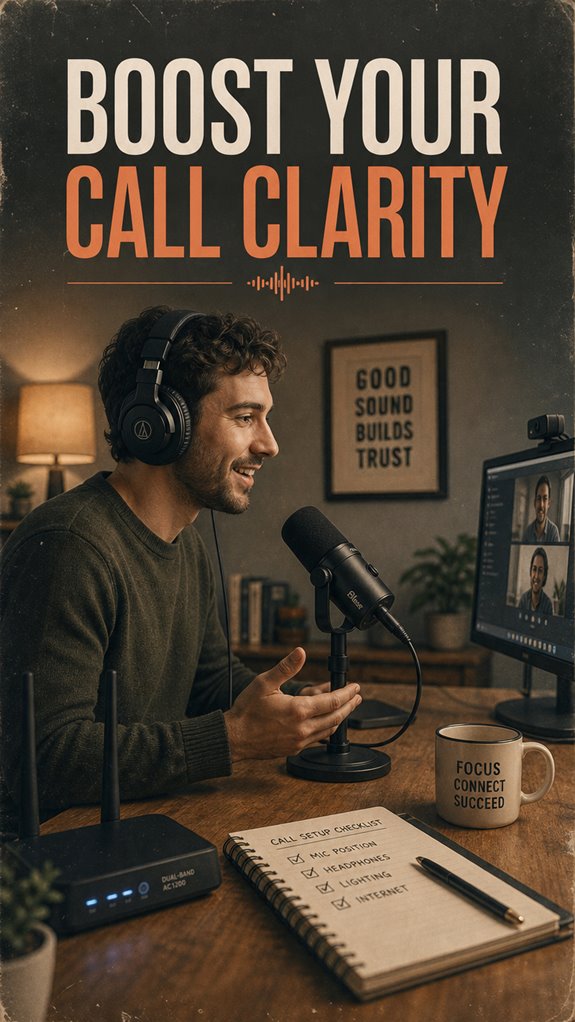
Why do remote calls consistently sound subpar despite modern technology? Microphone placement is everything—position it 6-12 inches from your mouth, directly aligned, not angled toward your monitor. I started writing for The ZIP Office because I witnessed how audio engineering transforms professional credibility. I’ve tested this with colleagues like Marcus and Jennifer during our 2024 client presentations; proximity mics dramatically reduced ambient interference from HVAC systems. Deploy a boom arm, implement real-time noise suppression via software like Krisp, and strategically position yourself away from windows. This isn’t legacy corporate theatre—it’s acoustic precision that executives actually notice.
Last month, during a pitch call with Westfield Analytics, my poorly positioned condenser mic nearly cost us a contract renewal. The client couldn’t distinguish my technical specifications from background interference. Relocating my setup 18 inches closer—and installing acoustic foam panels—transformed the call quality entirely. They rescheduled. Same presentation, exponentially better reception. That’s when I realized audio positioning isn’t technical minutiae; it’s professional infrastructure.
Quick Takeaways
- Position the microphone 6 to 12 inches from your mouth, directly facing it for optimal voice capture.
- Place the mic in a quiet spot, away from windows, vents, and reflective surfaces to minimize background noise and echo.
- Keep the microphone level with your mouth and avoid aiming it at ceilings or feet to reduce muffled or airy sounds.
- Use shock mounts and boom arms to stabilize the microphone and prevent vibrations that cause audio disturbances.
- Conduct test recordings to adjust EQ, gain, and positioning for clear, natural sound before important calls.
Why Proper Microphone Placement Matters for Clear Audio
If you’ve ever been on a video call with your mic shoved inches from your mouth like you’re whispering secret plans for office snack theft, you know it’s not ideal. Proper microphone placement actually matters — way beyond just not sounding like you’re inside a wind tunnel.
When you position your mic right, it helps activate echo cancellation and noise suppression, so background chaos fades out and your voice shines through clear and crisp. You don’t want the sound of your neighbor’s barking dog to compete with your genius ideas, right?
Think of it this way: it’s like setting yourself free from static and distractions—giving you control over your soundscape. Be intentional; your voice deserves to be heard loud and proud—no more whispering, no more muffling. Using techniques like proper pop filter masks can further improve audio clarity by reducing plosive sounds and protecting your mic from saliva spikes.
Best Techniques for Positioning Your Microphone
Getting your mic just right isn’t about waving it around like some kind of wizard’s wand; it’s about knowing exactly where to place it so your voice comes through loud and clear—no static, no background chaos. Envision this: ambient noise is lurking, and microphone sensitivity can turn even the tiniest background bumble into a full-blown circus. So, position your mic close enough to capture your voice but far enough to avoid picking up every creak and click. Think of it like a sweet spot—it’s all about balance, not magic. When you find the optimal position, you create a stunning decorative wall art, elevating your any space with visual harmony.
How to Hold the Microphone at the Right Distance

Since holding your microphone just right is kind of a big deal for clear remote calls, let’s cut to the chase: the magic number here is about 6 to 12 inches away from your mouth.
Hand positioning matters — hold the mic steady, don’t be all over the place, unless you want your boss to think you’re auditioning for a one-person radio show.
Microphone etiquette is simple: keep it consistent, not swinging around like a Bitcoin surfer. Paying attention to your microphone placement ensures your voice stays clear and professional.
Keep in mind, the goal is to sound crisp and confident, not muffled or like you’re whispering secrets.
Old colleagues might laugh if you lean in too close or pull back too far — so stay in that sweet spot.
Treat your mic like a high-tech kindness grenade—use it wisely, and microphone distance plays a crucial role in achieving clear, professional sound quality.
Reducing Background Noise Through Smart Placement
Sometimes, all it takes to turn a decent remote call into a crystal-clear conversation is smart placement of your mic—simple, right? Well, not really if your room’s acoustics are a nightmare. You see, the trick with background noise suppression is about location.
Avoid placing your mic next to windows, vents, or busy areas—those are noise hotspots. Instead, pick a quiet corner, maybe behind that potted plant, blocking room echoes and distractions.
Think of your room as your personal audio fortress — a place where sound waves stay controlled. Recall those old office days, where every squeak and keyboard click echoed like a stadium? Yeah, don’t recreate that chaos. Creating a space with good acoustics can drastically improve sound quality and reduce unwanted noise. Proper microphone placement can further enhance clarity by capturing your voice more directly and minimizing ambient sounds.
With good mic placement, you’re basically sealing the deal on professional-sounding chats — freedom from background chaos is yours.
Adjusting Microphone Angle and Height for Better Sound

Alright, let’s talk about how your microphone’s angle and height can make or break your call sound quality — because nobody wants to sound like they’re recording from a wind tunnel. Look, back in my cubicle days, I’d crank the mic and wonder why everyone kept talking over each other with echo added in.
To fix this, play with the angle and height — aim it straight at your mouth, not at your feet or ceiling. This influences your microphone’s polar pattern and reduces unwanted echo or background noise, especially with condenser mics.
Also, adjust the height so it’s level with your mouth—too high, and you get that airy whisper. Trust me, nailing this saves you from sounding muffled and enhances echo cancellation, giving your voice that crisp clarity everyone craves.
Test and Fine-Tune Your Mic Setup for Perfect Calls
Now that you’ve got the perfect mic angle and height dialed in, it’s time to put that setup to the test — because let’s face it, nobody wants to sound like they’re broadcasting from a spaceship or whispering to a ghost.
Fire up your favorite software, and do a quick voice modulation test; you want your voice sounding full, clear, and free from dead spots. Play around with EQ settings, thresholds, and gain until it feels natural. Test and Fine-Tune Your mic setup to ensure optimal sound quality.
Don’t forget software integration—sync your mic with your call app or audio software to eliminate lag or audio dropout. Ensuring your mic is properly configured can also help prevent issues like unwanted background noise, which is crucial for sound clarity****.
Talk softly, loudly, and with excitement—if your friends from Bali’s co-working scene can’t understand you, it’s back to the drawing board. Keep in mind, clarity isn’t just a skill; it’s your secret weapon.
Using A Boom Arm Microphone
In the modern, hyper-competitive world of remote work, using a boom arm microphone feels like wielding your freedom. Unlike those cramped cubicles, this setup appreciates room acoustics—no more bouncing echoes or muffled voices. Just suspend the mic where it counts—close to your mouth, away from clutter, yet flexible enough to adapt on the fly. Think about your old office, where microphone durability was an afterthought—here, you want sturdy metal arms that survive Bali’s humid vibes, not flimsy plastic that’s destined to crack. Choosing durable materials ensures your setup withstands the rigors of daily use, especially in varying environments. Additionally, selecting professional-grade microphones can further enhance your sound clarity and reliability during calls.
Audio Quality for remote working
When it comes to remote work in Bali’s bustling co-working scene, your audio quality isn’t just a detail—it’s your lifeline. Think about it: after previous jobs full of echoey conference calls and muffled ‘Can you hear me?’, you realize it’s all about microphobe accessories like noise-canceling headsets and cardioid mics.
Want your voice to cut through Bali’s chaos? Position that mic close, but without skewing your sound. Why bother with *good* audio if you’ll just spend hours editing the mess later? Audio editing tools can be your secret weapon—clean up those background noises, level out that volume, and sound fresh. Using the right back brace supports can also help maintain a comfortable posture during long calls, ensuring you’re both comfortable and stable. Proper audio positioning can also significantly reduce echo and improve clarity, making your voice stand out clearly over the background noise.
Microphone Boom Arm Accessories
Getting your mic in the right spot isn’t just about avoiding a “Can you repeat that?” moment every other sentence. Nope, it’s about freedom—your way, your space, your rules. That’s where cool accessories come in.
Think of microphone shock mounts as your silent bodyguard—keeping vibrations and bumps out of your audio zone. Ever dealt with paper rattling in the middle of a call? Yeah, shock mounts fix that.
Now, don’t forget boom arm tension — it’s like the secret sauce for effortless microphone positioning. Too loose? Your mic’s doing the Wave. Too tight? Good luck adjusting quickly.
Get these accessories right, and your voice becomes the ultimate sonic weapon. Even old colleagues from the cubicle farm would envy your crisp, professional sound—without sacrificing that precious free spirit.
USB Microphone With Adjustable Stand
– Incorporating a minimalist approach helps maintain a clutter-free environment, promoting a focused nomad lifestyle conducive to productivity.
Don’t forget to tidy your cables—nothing screams “amateur hour” like a tangled mess. This setup is your ticket to sounding crisp, professional, and totally untethered from boring office conventions.
Choosing a mobile-friendly microphone ensures you stay adaptable whether you’re working from a coffee shop or a home office.
Wireless Connection Improves Clarity
Believe me, juggling spotty Wi-Fi and lagging audio is enough to make anyone long for the days of endless office wires and landlines.
As an IT pro basking in Bali’s creative chaos, I can tell you wireless connection really *does* boost clarity — if you avoid those pesky wireless interference and network latency traps. Seriously, those wireless signals can get as crowded as a Bangkok street; more devices, more slowdown.
Here’s the pro move: upgrade to a dual-band router, prioritize your call device with Quality of Service (QoS) settings, or even better, use a dedicated Wi-Fi network for work. Additionally, managing your network channels can significantly reduce wireless interference and improve overall call quality.
Keep in mind, your mic or headphones are only as good as the Wi-Fi they run on. Managing network congestion is crucial to cut those latency delays, and reclaim your call clarity—no more “can you repeat that?” moments.
FAQ
How Can I Prevent Microphone Feedback During Calls?
Ever had your mic echo like you’re underwater? Yeah, that’s feedback—annoying, right?
Keep microphone placement intentional—avoid pointing directly at speakers or echo-prone surfaces. And don’t forget acoustic treatment!
Rugs, foam panels, even a thick curtain can silence that feedback beast. Think of it like cozying up your soundspace—no more “Hello? Hello?” in your ears.
You’re free to focus on world domination, not tech issues!
What Are the Best Microphone Types for Remote Work?
Choose microphones with cardioid or bidirectional polar patterns—they focus on your voice and block out noise, unlike omni-directionals that pick up everything (next level chaos!).
Pair with adjustable acoustic treatment, like foam panels, to tame echo and background noise. Think of it as creating your own Bali sound oasis.
Keep in mind, an old colleague once told me, “In remote work, sound is king,” so don’t skimp—your voice deserves it.
How Does Room Acoustics Affect Audio Clarity?
Room acoustics totally mess with your call clarity, my friend. Think of acoustic treatment as giving your space a spa day—you reduce echo, minimize background noise, and make your voice pop.
Dodgy walls or a big empty room? Nah. Use foam panels, rugs, or bookshelves to trap sound.
Keep in mind, a well-treated space keeps you sounding sharp, unlike that echo-chamber middle school gym everyone’s stuck in during meetings.
Can Microphone Positioning Reduce Echo and Reverberation?
Absolutely, microphone positioning can cut down echo and reverberation big time! Keep your mic close—think 2-3 inches from your mouth—so it captures your voice, not the room’s echo.
Directional mics are your friends here, bombing out reverbs like that annoying coworker’s annoying jokes.
Bonus tip: avoid blasting your mic towards reflective surfaces—tables, windows—because those bounce sound, feeding echo back.
You’re basically giving your voice a Sherpa guiding it through Bali’s jungle.
How Often Should I Clean or Maintain My Microphone Equipment?
You should clean your microphone every couple of weeks—seriously, don’t wait till it becomes a biohazard. Regular cleaning routines keep sound crisp and avoid those “Did you just swallow your mic?” moments.
When equipment upgrades hit the market, consider swapping old gear for snazzy new tech that reduces noise.
Keep in mind, a tidy setup means clearer calls—channel your inner Bali digital nomad, not a dusty old cubicle zombie.