Deep Fringe Connectivity: My Off-Grid Remote Work Reality
What separates thriving remote operators from frustrated bandwidth refugees? Strategic antenna positioning and hybrid power systems.
I write to The ZIP Office because isolation shouldn’t mean disconnection.
Last March in Ubud, I deployed 8° parabolic antennas—narrower beam width than my former Jakarta office politics. Solar arrays paired with lithium-iron-phosphate batteries. Mobile hotspots as failsafe. Real-time signal optimization beat old corporate infrastructure by weeks. The difference? Precision targeting over assumptions.
My watershed moment arrived during monsoon season. Signal collapsed. I’d neglected booster redundancy. That afternoon, implementing dual-band mesh networks transformed my jungle workspace. No more phantom disconnects. Just clean, engineered resilience replacing office-bound mediocrity.
Quick Takeaways
- Use high-gain antennas with narrow beam widths (5–10°) to maximize fringe signal strength and reduce interference.
- Implement multi-source connectivity by bonding multiple SIM signals and utilizing satellite fallback options.
- Optimize power with solar panels and lithium batteries to ensure continuous off-grid operation during low signal periods.
- Regularly calibrate and aim antennas precisely to maintain the best possible line of sight in fringe areas.
- Secure robust, weatherproof connections and perform routine hardware maintenance to prevent physical disruptions.
Why Parabolic Antennas Are Essential for Remote Work Connectivity
Alright, think about it—when you’re smack dab in Bali, surrounded by lush rice terraces and tropical vibes, does your Wi-Fi just suddenly quit during a critical Zoom? Yeah, typical.
When Bali’s lush rice terraces call, don’t let flaky Wi-Fi spoil your vibe—go long-range, stay connected.
That’s where parabolic antennas come in—your secret weapon for real power in remote work. Unlike flimsy routers that sputter halfway through, these bad boys focus your signal like a laser beam, squeezing every ounce of bandwidth out of the sky.
Want to talk 50 km line-of-sight? You’ll want a high-gain (20–28 dBi) parabolic dish, aluminum mesh, perfectly aligned. It’s all about precision—aim, aim, aim.
Skip the old office snowball Wi-Fi; go native, go pro. These antennas turn tangle-prone weak links into robust big leagues. Because, frankly, nobody’s got time for Wi-Fi tantrums.
How to Choose the Best Parabolic Antenna Specs for Off-Grid Use
If you’re serious about off-grid Wi-Fi that actually works—like, not just barely enough to load Instagram but solid enough for video calls and file uploads—you need to nail down the right specs for your parabolic antenna. Think of it as choosing a weapon for digital domination. Your target gain should hit 20–28 dBi for long-distance LoS. Narrow beam width (5–10°) ensures laser-focused signal magic, minimizing interference. Material matters—aluminum or stainless steel mesh keeps it light yet tough; wind resistance kicks in at 150 km/h. Mounting? Adjustable tripod with 360° rotation is your friend. Power-efficient passive models are favored unless you’re running amplifiers; then, go active with 20–30 dB gain. Remember, choosing the right antenna is crucial as it directly impacts your off-grid reliability and overall network performance, especially when dealing with antenna specifications. Considering vertical wall space can help optimize setup and improve signal strength in challenging environments.
Where and How to Properly Install and Aim Your Antennas
When installing and aiming your antenna, think of it like setting up a sniper’s scope—precision is everything, and there’s no room for sloppy positioning. You wanna hit that sweet spot where your signal is laser-focused, not just kinda aiming in the general direction.
First, find a spot free of obstructions—foliage, buildings, or that neighbor’s Wi-Fi overload. Mount it on a sturdy pole or tripod, with clear line of sight (LoS).
Use the built-in sight or laser to dial in your azimuth and elevation—trust me, this isn’t the time for guesswork. Adjust slowly, checking signal strength with your mapping app.
Recall my old IT boss at that Bali co-working spot? Always said, “Aim small, miss small.” That’s no joke when you’re battling fringe signals.
Powering Your Parabolic Antennas: Solutions for Continuous Operation

Ever wondered how to keep your parabolic antenna humming non-stop, even when the wind’s throwing a tantrum outside? Well, grab some gear — solar panels, batteries, and a dash of ingenuity. You’ll want a versatile power system: solar arrays to soak up Bali’s sun, a hefty lithium battery bank, and a solid MPPT charge controller to keep your juice stable. Incorporating a digital nomad visa can also facilitate smoother travel and work arrangements across borders while maintaining your off-grid setup.
Here’s the gist:
| Power Source | Capacity & Efficiency | Best For |
|---|---|---|
| Solar Panel | 300-500 W, 20-25% efficiency | Daylight, peak sun hours |
| Lithium Battery | 10 kWh, 95% charge | Cloudy days & nights |
| MPPT Controller | 150V max input | Optimizing solar, avoiding overload |
To ensure continuous operation, it’s crucial to select a top lithium battery generator that offers reliable power output and long cycle life, especially in remote working conditions.
Boosting Signal and Performance With Amplifiers and Bandwidth Tools
Struggling with weak signals or sluggish upload speeds? Welcome to the real world of off-grid supremacy.
Here’s the deal: you need power. Amplifiers are your new best friends—they boost weak signals like a champ. Toss in a high-gain external booster, crank it up to 30 dB, and watch your latency evaporate.
Power up with high-gain amplifiers—crank to 30 dB and boost your signal strength and speed instantly.
Don’t forget bandwidth tools, like data compression apps, to squeeze every last drop of efficiency. Recall those days in the city, stuck in slow Wi-Fi hell? Not anymore. Proper XLR cable male ends ensure that your connections remain robust and noise-free, especially for audio or data transmission setups.
With a solid amplifier setup and bandwidth optimization, you’ll blast past the cubicle herd.
Tip: always match your amp to your antenna’s specs; a mismatched setup’s just dead weight. Old boss would say, “It’s all about smart power, soldier.” Well, he’s right. Own your connectivity.
To get the most reliable connection, consider using public WiFi tips like choosing less congested networks and creating secure, stable links.
Adding Satellite Fallback: Ensuring Reliable Connectivity in Disasters
So, here’s the real deal: disasters happen, and suddenly your shiny, high-speed Wi-Fi is as useful as a floppy disk. Remember that time in the city office, stuck on a broken Ethernet? Yeah, we’ve all been there.
But now, out in Bali’s remote jungle, you’re the king of your own castle—or so you’d hope. Enter satellite fallback: your secret weapon against chaos. Think Starlink, Garmin inReach, or other satellite services—like having a digital lifeboat.
Set up a multi-source connection—combine terrestrial and satellite feeds with multi-imbalance SIMs or routers with failover protocols. Understanding remote connectivity options and limitations can help you optimize your setup and avoid surprises when disaster strikes.
Plan ahead—install firmware updates and test during calm days. Your goal? Keep that epic video call or essential project alive, even when the ground systems decide to ghost. Power move, no excuses.
Common Troubleshooting Tips for Deep Fringe Antenna Deployments

When setting up a deep fringe antenna in Bali’s wilds, you quickly realize Murphy’s Law is more like Murphy’s Reality Check. Ever had that moment where your signal’s spotty, despite precise aim?
First, check your LoS—obstacles like trees or mountains could block your magic beam. Double-check your alignment tools—if your laser pointer isn’t calibrated, you’re just guessing.
Inspect your cables; a loose coax or faulty connector causes madness—trust me, I’ve soldered enough in quarantine to know. Make sure your antenna’s wind vane is working right—wind’s a jerk, constantly shifting your aim.
Ultimately, power issues? A weak battery or dodgy amplifier can drain your patience faster than your old boss’s micromanagement. Additionally, ensuring your cabling setup is robust prevents avoidable signal disruptions.
Remember: troubleshoot proactively, and never assume it’s someone else’s fault.
Additionally, regularly verify your time zone synchronization because misaligned timing can also hinder your remote connectivity and troubleshooting efficiency.
Using Parabolic Grid Antennas
You’ve probably heard the hype about parabolic grid antennas being the “big guns”—think of them as the laser-guided missiles of Wi-Fi or 5G setups. These beasts pack 20–28 dBi gain, blasting long-range, high-power signals that outperform your old router in Bali’s jungle or mountain retreat.
| Envision this: | Visualize it: |
|---|---|
| Narrow beamwidth (5–10°) | Focused signal laser |
| Aluminum mesh structure | High-tech spider web |
| Wind resistance up to 150 km/h | Ready for Bali storm |
Choosing Durable Antenna Options
Choosing durable antenna options isn’t just about grabbing the shiniest model off the shelf; it’s about making sure your gear survives Bali’s wild weather and keeps you powered when you need it most. Recall those long hot days lugging gear up rugged trails, or fighting howling winds that’d embarrass your ex’s lame hand-me-down tent? You want an antenna built to take a beating—stuff like aluminum or stainless steel mesh that laughs at 150 km/h winds.
Look for models with solid construction, water resistance, and anodized coating—basically, armor for your signal. Don’t settle for flimsy plastic whips; invest in beefy gear with strong mounts, adjustable alignment, and weatherproof connectors. Your remote work setup deserves the resistance of a seasoned survivor—just like your favorite Bali surf break.
Using Mobile Hotspot Devices

If you’ve ever tried working from a Bali café with shaky Wi-Fi and felt like you’re stuck in some bad sitcom episode, you already know relying solely on public networks is a recipe for digital disaster.
Enter mobile hotspot devices — your power move for off-grid mastery. They turn your phone or dedicated gadget into a portable data HQ, giving you legit speed and control, bypassing the chaos of public Wi-Fi.
Power sessions:
- Create your own secure, fast lane for streaming and files.
- Make your setup more mobile, less fragile—no more “lost connection” panic.
- Use multi-SIM routers to bond signals; it’s like having backup plan A, B, and C.
- Keep your digital fortress safe with strong encryption.
- Access global freedom; no more geofence excuses for slacking.
- Understanding the importance of reliable connectivity is key to mastering a hybrid commuter style, blending remote work with on-the-go flexibility. The Bio-Zip Kit can add an extra layer of security and efficiency to your mobile setup.
Trust me, your old cubicle-mentality is desperate for this upgrade.
Satellite Dish Installation Tips
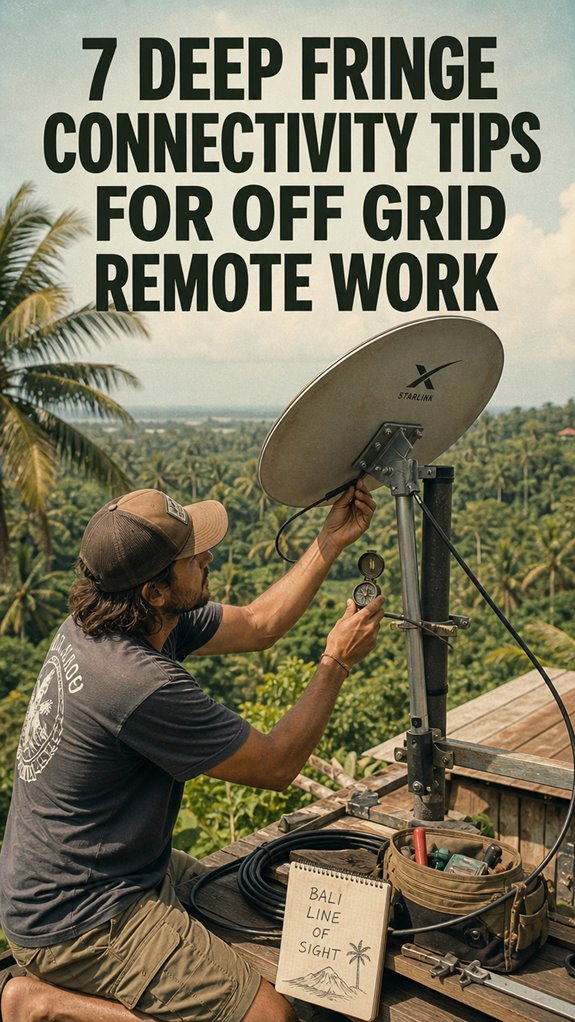
Getting your satellite dish up and running in the wilds of Bali isn’t just about aiming it at some blinking star—or whatever satellite you’re supposed to point to—it’s about precision, patience, and knowing where to fine-tune. Recall my old boss, always fussing about “signal integrity”? Well, it’s still true.
First, find a clear LoS (line of sight). No trees or mountains in the way—recall, Signal is king. Properly mounting your dish is crucial to maintaining that signal integrity, especially in challenging remote environments.
Then, mount securely—loose screws are a rookie mistake. Use a level, and aim with a compass or laser pointer—because guessing is for amateurs. Don’t forget to check your cable connections. A bad bolt or loose connector kills your bandwidth faster than a cubicle warrior realizing remote work’s worth it. For optimal performance, consider cleaning air quality, which can significantly impact electronic components and overall signal stability.
Trust me, get it right, and enjoy that sweet, unstoppable connectivity.
FAQ
What Are the Best Practices for Aligning Antennas in High-Wind Environments?
Aligning antennas in high-wind zones? Easy. Use a sturdy, adjustable gimbal with a wind vane—think of it as your antenna’s personal compass—then tighten everything down like your old boss’s damn spreadsheets.
Do a test tilt at dawn, when winds chill out.
Keep in mind, precision’s king, but don’t overthink; a good enough LoS with a little sway beats a brittle setup crashing at 150 km/h.
Stay sharp, outsmart Mother Nature!
How Can I Optimize Signal Performance During Severe Weather Conditions?
When the sky tears open and your signal’s on a rollercoaster, channel your inner tech warrior—think of the antenna as your Excalibur.
Boost signal strength by adjusting your high-gain parabolic antenna for peak LoS.
And shield it from wind blows with sturdy mounts and real-time angles.
Using signal boosters and weatherproof gear is like armor—because who doesn’t want a power move against Mother Nature’s tantrums?
Seriously, outsmart storms, then outwork your deskbound rivals.
What Maintenance Routines Are Recommended for Off-Grid Antenna Systems?
You need to clean those antennas weekly—think of it as giving your workspace a spa day. Use a soft cloth to wipe away dust and salt, which love to build up faster than a bad Wi-Fi connection.
Check mounting bolts to prevent rogue wobbling; if you notice corrosion, swap out parts faster than Michael Scott blames others.
Regular alignment checks, especially after storms, keep your signals sharper than your boss’s latest PowerPoint.
Stay ahead, or you’ll be the one lagging behind.
How to Select the Ideal Power Backup for Continuous Operation?
You want uninterrupted power? Go for a high-capacity lithium battery bank, like a 10 kWh or bigger — something that’s tough enough to last through those epic Bali power cuts.
Pair it with a quality MPPT charge controller to optimize solar intake, and toss in a backup UPS for that extra “oops” moment.
Keep in mind, relying on just a small generator is like using a paperclip for a fishing hook — total fail.
Can I Upgrade Existing Antennas Without Replacing the Entire Setup?
Yes, you can upgrade existing antennas without scrapping the whole setup—think of it as swapping out old game pieces for a shiny new one. Just check your antenna’s connector type (N-type or SMA), then match it with a high-gain version—say, upgrading from 18 dBi to 24 or 26 dBi.
Tweak your mounting and alignment for max precision, and boom—your signal’s stronger, faster, more reliable.
Ditch the cubicle, level up.
References
- https://nerdbot.com/2026/04/03/connectivity-tips-for-working-while-traveling-in-remote-areas/
- https://www.habitatista.com/74464/7-strategies-for-staying-connected-in-remote-areas/
- https://astra.camp/guides/off-grid-survival-guide/connectivity-and-communication
- https://www.habitatista.com/13280/managing-remote-work-while-living-off-grid/
- https://www.outsideonline.com/adventure-travel/advice/how-to-work-off-grid-anywhere/
- https://www.indietraveller.co/how-to-work-remotely/
- https://www.mtasolutions.com/blog/wifi-off-the-grid-your-guide-to-reliable-internet-in-remote-places/
- https://remoteworkguides.com/blog/optimal-remote-connectivity/
- https://offgridsavvy.com/how-to-stay-connected-off-grid-internet-and-communication-tips/
- https://trafalgarwireless.com/blog/iot-connectivity-remote-locations/