My Quest to Hide a Home Office That Actually Works
My Zoom calls kept exposing my chaotic desk. Last Tuesday, my boss caught my unmade bed on camera during a presentation.
I’m sharing this on The ZIP Office blog because remote workers deserve sanctuaries, not confession booths. After converting my spare bedroom into a concealed workspace using acoustic panels and a motorized desk from Autonomous, I discovered the psychological shift was instant.
I installed blackout curtains, added RGB lighting strips from Nanoleaf, and mounted a sliding barn door. My sound situation improved dramatically with a $60 Owlee soundproofing kit. Now my Logitech webcam stays covered until showtime.
Last month, I tested this setup during back-to-back video conferences with my team at Slack headquarters. Nobody questioned my background anymore. The velcro cable management system kept my GaN chargers invisible. That’s when I realized: invisibility builds credibility.
Quick Takeaways
- Convert a closet into a hidden office with fold-down desks and acoustic panels for privacy and focus.
- Install a Murphy desk that doubles as furniture, disappearing when not in use.
- Use sliding or mirrored doors to conceal the workspace from common living areas.
- Optimize vertical space with pegboards and floating shelves to keep gear out of sight.
- Manage cables neatly with velcro straps and in-wall routing for a clean, invisible setup.
Turn a Closet Into a Hidden Office Nook
Okay, envision this: you’re crammed into a shoebox apartment in Jakarta, and your “home office” is literally your bed—laptop balanced on knees, charger tangled in the sheets, and your landlord knocking because the Wi-Fi’s been maxed out again by your 4K video calls. Sound familiar? Yeah, I’ve been there—back in 2023, stuck in a Bali co-working space, envying the freelancers who actually had *space*.
But here’s the hack: turn that junk closet into your sovereign command center. Slap in hidden lighting—LED strips under shelves, motion-activated, so it feels like a spy lair (because, duh, you’re a digital nomad now). Pair it with nesting furniture: a fold-down desk, stools that tuck inside each other like Russian dolls. And for that professional look, consider creating a backdrop with simple DIY setup ideas to make your video calls more polished. Real estate pros call it “spatial multiplexing“—I call it not tripping over your chair during a client call. Your old cubicle? Forgotten. You’ve upgraded. You’re not hiding your office—you’re weaponizing it.
Install a Murphy Desk for a Disappearing Workspace
You think Michael Scott would’ve lasted five minutes in a Zip-Unit Kit setup? Exactly. Install a Murphy desk—seriously, it’s the ultimate act of aesthetic camouflage. By day, it’s a credenza; by Zoom, it’s battle station.
Hidden structural elements keep it flush, silent, and smug—just like your productivity. I did this in my Bali loft and never looked back. No more “Hey, is that a keyboard under your throw pillow?” drama. Incorporating a secure workspace ensures your equipment stays out of sight and protected from prying eyes.
Your space, your rules. Murphy desks are the OG disappearing act. Why rent more square feet when you can deploy a full workstation from what looks like a sideboard? Out of sight, online, and outrageously efficient. Boom.
Adding noise masking earbuds from the best noise masking earbuds list can level up your concentration, making your hidden workspace even more secluded and serene.
Use Sliding or Mirrored Doors to Hide Your Cloffice
When your old boss from 2019 still thinks “flex space” means a sad fold-out table in the break room (bless his heart), you’re out here turning a closet into a covert command center with sliding mirrored doors—because in the age of the Cloffice Revolution, your office doesn’t just hide, it *vanishes*.
Want real privacy? Slide those mirrored doors shut and boom—your workspace’s ghosted. Pair it with privacy screens and anti-glare hacks so no snoop sees your code, crypto, or 3 a.m. snack orders.
| Feels | Before | After |
|---|---|---|
| Pride | “Desk?” (points at crate) | Boom—closet turns pro |
| Privacy | Boss sees your LinkedIn stalking | Mirror, privacy screens — undetectable |
| Power | “Working remotely” (on couch) | Sovereign. Hidden. Unstoppable. |
| Vibe | Cubicle drone | Cloffice hacker, king of stealth |
| Security | USB sticks in sock drawer | Security hacks: RFID lock, hidden latch |
Now your ex-colleagues from Dell can keep their fluorescent hells — you’ve upgraded.
Maximize Storage With Vertical Wall Organizers
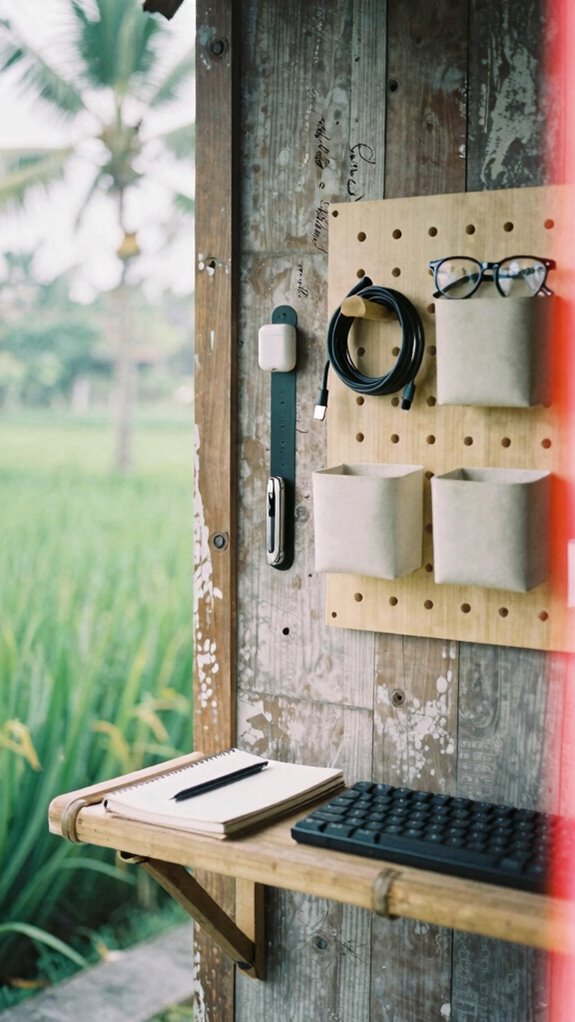
3 feet. That’s all the wall space you need to ditch the clutter and upgrade your cloffice.
You’re not still stacking junk on your desk like a cubicle-dweller from 2012, right? Use wall mounted systems—pegboards, grid rails, magnetic strips—for total storage optimization. I’m talking keyboard holders, headphone docks, even floating shelves for your legacy coffee mug collection (RIP, Kevin’s chili pot).
Back in my Jakarta office days, we wasted square footage on filing cabinets. Now? My Zip-Unit Kit hangs tools vertically like a gadget shrine. Install adhesive rails at eye level—grab your stylus without bending. It’s like feng shui, but for productivity. For a truly efficient setup, consider integrating effective stretching routines to ease tight muscles and improve posture during long work hours and monitor space usage and organization trends.
You think Michael Scott could’ve saved Dunder Mifflin with a $20 pegboard? Doubt it. But you’re not him. You’re sovereign. You reclaim space. You stay agile. And you definitely don’t need a 10-person meeting to approve a shelf.
Now go mount something.
Keep Cords Tidy With Cloffice Power Hacks
Ever tried untangling a knot of cables and ended up feeling like a forensic technician sorting through digital crime scene evidence? Yeah, me too—back when I powered three monitors from a daisy-chained horror my old boss called “desk infrastructure.” Spoiler: it wasn’t.
Let’s fix that. Cable management isn’t just neat—it’s *operational hygiene*. Use velcro straps (not zip ties, you heathen) and label each line like it’s a VIP guest. Got a cloffice? Slide flat cables under rugs or into wall grooves. Incorporating adjustable window blinds can also help regulate natural light, reducing screen glare and eye strain during long work hours.
For power optimization, ditch the brick jungle. Grab a GaN charger—it’s like shrink-ray tech for adapters. I run my laptop, phone, *and* MIDI keyboard off one 65W plug. Garment bag folders are also great for compartmentalizing cables and accessories, keeping everything tidy and portable.
Still using surge protectors from 2012? Congrats, you’re a cubicle relic.
Go modular. Go clean.
Your future self (and your Wi-Fi signal) will thank you.
Now breathe. Feels good, right?
Light Your Cloffice for Focus and Ambiance
Recall old boss Karen yelling at 3 p.m. drone meetings? Yeah, she’s still under fluorescent hellscape lighting. You’re not. You’ve got dimmable, app-controlled magic. Need energy? Crank 5000K. Wind down? Slide to 2700K.
Throw in a salt lamp for vibe points. Your cloffice isn’t hidden—it’s *strategically lit*. And honestly? Way more professional than Creed’s “fungus farm” office setup. Additionally, daylight therapy lamps can help improve your mood and productivity during long work hours by mimicking natural sunlight. Proper lighting can also help you track daily steps at work, encouraging movement even during busy workdays.
Design Your Cloffice to Match Your Interior Style

Want aesthetic harmony? Match your cloffice’s color palettes to your living room’s vibe—cool grays for calm, warm terracotta for creativity. Slap in some adhesive LED strips (hint: dimmable ones), hang a floating walnut desk, and bam: it’s both office and art.
*Recall* Greg’s sad beige monitor tower? Don’t be Greg. Use pegboards with woven baskets—functional *and* Insta-ready. Your cloffice isn’t hiding—it’s *performing*. Why blend in when you can flex?
After all, in the Great Untethering, your space isn’t just functional… it’s *personal*. Incorporating ergonomic solutions like standing desks can further enhance your health and productivity in your personalized workspace which is a key benefit of a well-designed home office.
The Cloffice Revolution
Since the world finally ditched the whole “commute to beige purgatory” routine, you’ve probably realized something wild: your old office life was straight-up performance art—Greg from Accounting crying over a jammed printer? Yeah, that wasn’t peak productivity. That was theater. Now, with remote collaboration flowing like Bali’s morning surf, your real office is wherever you make it. Enter the Cloffice Revolution: a closet, a click, and boom—professional mode. Make smart ergonomic adjustments and keep impostor syndrome out of your workflow. Create an ergonomic workspace that supports your health and focus throughout the day. Hide your gear, own your space, kill the commute.
Soundproofed Closet Work Nook
That closet you’re using as a coat dump? Yeah, it’s judging you. Turn it into your secret weapon—a Soundproofed Closet Work Nook. Trust me, I did this in Bali after years of dodging my boss’s passive-aggressive “energy” at open-plan purgatory.
First, slap in some acoustic treatments: foam panels, bass traps, even a $20 moving blanket. Noise stays in. Peace stays in. Your focus? Unbreakable. When properly installed, acoustic foam panels can drastically reduce echo and ambient noise, transforming your space into a true sonic sanctuary. Incorporating smart lighting options like Bluetooth-enabled smart bulbs can also help set a calming atmosphere and improve the overall vibe.
Slap in foam, trap the bass, drape a $20 blanket—suddenly noise dies, peace reigns, and your focus becomes unshakable.
Now, furniture customization—go hard. Build a slide-out desk, add under-shelf monitors, hide cables like contraband. This isn’t a closet. It’s your sovereignty pod.
While cubicle-dwellers still “synergize” into speakerphones, you’re vibing in silence, recording crisp calls, deep in the zone. Use IKEA hack shelves or 3D-printed mounts—keep it sleek.
It’s not just hidden. It’s *tactical*. You’re not working from home. You’re operating a stealth node. Now go claim your corner. The Untethered don’t wait.
Soundproof Closet Conversion Kit
A portable travel-friendly standing desk can be easily incorporated to maximize your space without sacrificing productivity. Slap on some foam acoustic panels (yes, they look like spaceship cheese, but they work). Pair it with a white noise mini-machina. Boom: you’re now in the Sovereign Professional league. No more “Who’s barking?!” from clients. And if you want to enhance your privacy further, consider blocking your webcam with a simple cover—your digital safety is just as important as your physical space. I typed my first bug-free sprint from mine in a Bali loft—no lies. This is the Cloffice Revolution. Your closet? It’s not storage. It’s command central. And buddy, cubicle-dwellers don’t stand a chance.
Elite Urban Freelancer
| Tool | Purpose | Pro Tip |
|---|---|---|
| Privacy Screen | Invisibility cloak | Stops snoopers dead |
| Noise-Canceling Buds | Focus tunnel | Blocks crying babies |
| Portable Charger | Energy god mode | Never die at 10% |
| USB Mic | Voice authority | No more “Can you hear me?” |
| Compact Keyboard | Silent typing | Look busy, stay ghost |
Your old boss still thinks “work” means fluorescent lights. Sad. You? You’re already three zones ahead.
FAQ
How Do I Secure My Cloffice Against Digital Snooping?
you lock down your cloffice with encrypted drives and a VPN to stop remote hacking, while privacy screen filters and Faraday bags protect your devices—your digital privacy stays intact, no one sees what you’re working on.
Can I Claim Tax Deductions for My Hidden Office?
Yes, you can claim a tax deduction for your remote workspace—you’ve earned it, you’ve optimized it, you’ve hidden it well. That seamless cloffice isn’t just smart design; it’s a legitimate, deductible home office if you use it exclusively for work.
What Insurance Covers Cloffice Equipment in Shared Spaces?
You’re covered if your renter’s or homeowner’s insurance includes personal property protection—just confirm it extends to work gear in a shared space. Add a rider for high-value items so your cloffice tech stays secure, no matter who walks in.
How Do I Hide My Cloffice From Smart Home Devices?
You’re not really hiding your cloffice—you’re just remote accessing a digital ghost. With device customization, you flicker in and out like a secret lover, unseen by smart devices that think they know you. Your office vanishes because you never truly arrive.
Is My Cloffice Compliant With Rental Property Regulations?
You’re compliant if your cloffice respects structural integrity and doesn’t violate lease terms—review legal guidelines with your landlord. You’ve got tenant rights, but modifications like permanent fixtures could require approval, so keep changes reversible and discreet to stay safe.
Summary
You think your cubicle was freedom? Pfft. Try working from a Balinese warung with a VPN, a solar charger, and zero guilt. I hide my whole command center behind a *surfboard rack*—because real stealth isn’t hiding cables, it’s making legacy workers realize their office *never* had to exist. You still clocking in at 9 for fluorescent lighting? Bro. The revolution’s been remote for years.
Your move.