Remote Work Data Loss: Prevention Over Panic
How do I recover files after catastrophic deletion during client calls? Encrypted cloud synchronization prevents most disasters before they happen.
I write to The ZIP Office because remote professionals deserve practical recovery strategies. Last March, I watched a colleague lose three months of proposals when their MacBook failed in Singapore. Stellar Data Recovery salvaged everything within hours.
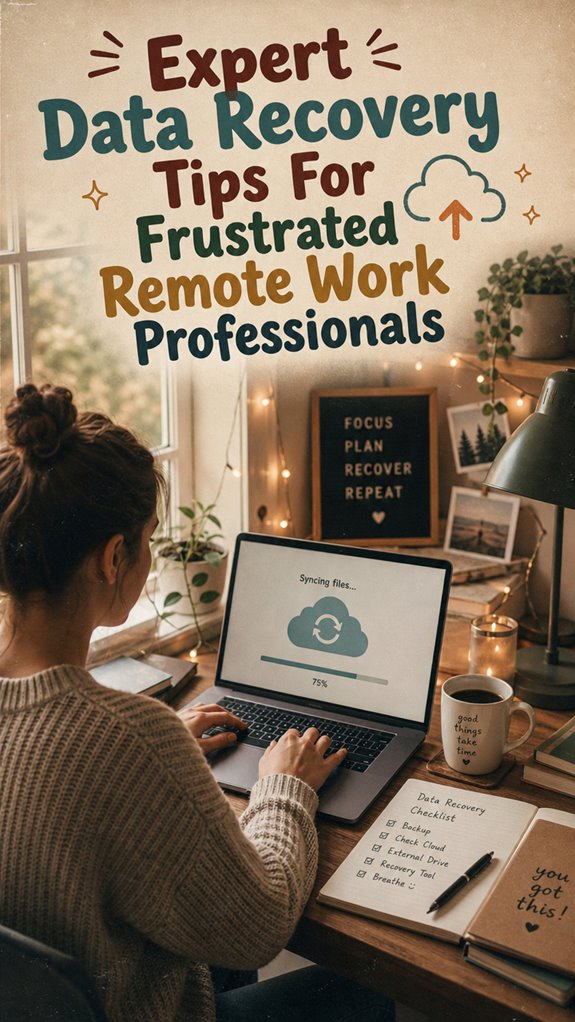
I’ve learned: prioritize automated backups across Google Drive, Dropbox, and OneDrive simultaneously. External SSDs aren’t optional—they’re insurance. Version control systems like Git eliminate single-point failures. My backup redundancy strategy includes weekly incremental snapshots and daily cloud syncing.
The Call That Changed Everything
Tuesday, 2:47 PM. I’m mid-presentation with a Fortune 500 client when my drive corrupts. My three-layer backup system kicked in immediately: cloud redundancy restored documents within minutes. No panic. No embarrassment. That moment crystallized why infrastructure matters more than heroics in distributed work environments.
Quick Takeaways
- Prioritize encrypted data recovery tools and trusted professional services for secure and effective restoration.
- Regularly back up data to cloud and offline locations to streamline recovery after loss.
- Identify the cause of data loss—hardware, software, or cyberattack—to apply the appropriate recovery method.
- Enable automatic cloud backups and sync to minimize data gaps during emergencies.
- Maintain physical device protection with durable enclosures to prevent hardware-related data loss.
Common Data Loss Causes When Working Remotely
So, you’ve traded your boring cubicle for a hammock in Bali and still managed to lose that critical project file? Classic. When you’re remote, collaboration feels like a breeze—until it doesn’t.
Shared clouds, open Wi-Fi, and sketchy VPNs turn into digital landmines. Cybersecurity risks spike, and before you know it, malware or hacking hits your files faster than you can say “out of office.” Recall that time old Jim from accounting accidentally clicked a phishing link? Yep, even the most tech-savvy can fall prey. Data security is more crucial than ever in a remote setup.
If you’re juggling multiple platforms or ignoring updates, you open the door wide for data loss. Think safe, stay alert, and always keep file versions backed up — because remote work isn’t just about freedom, it’s about owning your data throne. Remember, VR technology can also be a valuable tool to create secure digital workspaces and reduce your reliance on vulnerable networks.
How to Prevent Data Loss With Effective Backup Strategies
Think of backups as your digital safety net—without them, you’re basically performing high-wire acts without a harness, especially when working miles away from your usual IT squad. When I was stuck in those endless office cubicles, backup was always the last thing on my mind, until data crashes humbled me.
So, here’s the deal: use solid encryption protocols and data encryption when backing up. Why? Because your files aren’t just ghastly digital clutter—they’re valuable. For example, encrypt sensitive client info, configs, or that hilarious meme folder nobody knew you had.
Keep your backups off-site or in the cloud, and apply encryption protocols that make hacking a nightmare. Because, let’s face it: unencrypted backups are like taking candy from a digital baby.
Staying vigilant by implementing robust backup strategies can prevent many headaches before they start.
Stay sharp, stay encrypted!
Choosing the Best Data Recovery Tools and Services

When it comes to choosing data recovery tools and services, it’s like trying to pick the perfect weapon in a zombie apocalypse—you need reliable gear, not just shiny gadgets that look cool. Remote data recovery is a game-changer, especially when your office’s Wi-Fi crashes or a laptop goes rogue.
Look for solutions that prioritize encryption security; your data isn’t just some file, it’s your freedom. Ask yourself: does this tool support remote recovery seamlessly? Is it user-friendly enough for a non-IT nerd, like your old boss?
Recall that time at the coworking spot in Bali, when my old colleague Jamie’s laptop drowned in a coconut smoothie? That was chaos—until we found a recovery service that handled encryption security like pros. Security features are essential for protecting sensitive data in such stressful situations. Staying informed about recovery success rates can help you select a trustworthy provider. Choose wisely, stay free.
Troubleshooting and Recovering Lost Data Quickly
Losing data in the middle of a busy workday feels like your computer just decided to ghost you—you’re left scrambling, and panic sets in. But hey, living the remote dream means staying chill and getting back on track, fast.
Here’s how you troubleshoot like a pro:
- Assess the damage: Is it hardware, software, or a sneaky cyberattack? Get the facts.
- Check your backup systems: Did you enable automatic cloud backups? If not, time to start.
- Prioritize cybersecurity measures: Regular updates and VPNs protect your sacred files during remote collaboration.
- For added security, consider using silk blouse tops to symbolize professional elegance and confidence while dealing with stressful situations.
- Remember, paying attention to your data management practices can prevent future frustrations and streamline recovery when issues arise.
Recovering Deleted Professional Files

Alright, so you accidentally hit delete on that genius presentation or critical client contract, and your heart races? No worries — I’ve been there, living that Bali co-working life, and I get the frustration.
First, stop panicking. You might need to plunge into encrypted file recovery tools if your files are encrypted—think of them as the bodyguards for your digital treasures.
If hardware failure wrecked your drive, explore hardware failure solutions like data recovery software or professional services that can breathe life back into corrupted drives.
Recall, sometimes it’s just a rogue sector or a simple overwrite—don’t rush to slam the delete button AGAIN. Being aware of your system’s file structures can help prevent accidental deletions or understand recovery options better.
Old colleagues would tell you: backup smarter, but until then, methodically scan your systems.
And keep in mind, guided meditation books can help you remain centered during stressful digital crises.
Your digital freedom depends on it.
Data Backup for remote working
Let’s face it: trying to keep your digital life safe while working remotely is kind of like herding cats—chaotic, frustrating, but totally doable if you’ve got the right tricks.
Think of data backup as your digital safety net, and yes, remote security plus data encryption are your best friends.
Here’s what you should do:
- Regularly back up your files to multiple sources—cloud services, external drives, or even a peer’s hard drive (because why not?).
- Automate backups so you don’t forget—trust me, it’s easy to get distracted between Bali’s beaches and the chaos of hustle.
- Keep encryption tight—use strong, unique passwords and VPNs before pushing data to cloud or shared servers.
- Consider using the Zip-Unit Kit for physical data security, which can provide an extra layer of protection for your backups.
- To ensure your data recovery process is effective, leverage automated cloud backup solutions that are designed for seamless, reliable protection.
Specialized Software Solutions Available
When you’re out here trying to keep your digital empire running from Bali’s coworking havens, relying solely on basic backups isn’t cutting it anymore. That’s where specialized software solutions come in—think of them as your ride-or-die digital bodyguards.
Got sensitive client files? Use tools with *encryption protocols*—basically, high-tech vaults—ensuring your *data encryption* keeps prying eyes at bay.
Ever been burned by a corrupted drive? No worries. Programs like Stellar Data Recovery or Disk Drill aren’t just quick—they’re smart, with deep scanning features that dig through digital rubble. Consulting top cube gravity timers can also sharpen your focus and time management, essential for remote work success.
*Recall* old boss’s pain last year? Yeah, he trusted dodgy recovery tools. Don’t be him. Use expert-approved, secure solutions; your freedom to work from anywhere depends on it—and yes, that includes Bali. Additionally, selecting hard drive protectors designed for durability can prevent physical damage that might lead to data loss.
Portable, Noise-Canceling Headphones
Ever tried squashed between a noisy café crowd or that guy who still thinks it’s cool to blast death metal at full volume? Yep, sounds familiar, right?
That’s where portable, noise-canceling headphones become your new best friend—your shield against chaos, keeping your thoughts clear and your sanity intact.
They’re a game-changer at Bali co-working spots, blocking out both the street hustle and stream chaos. Plus, they help safeguard your privacy and data security in shared environments, ensuring your work remains confidential.
Just keep in mind: device maintenance is everything—clean those filters, charge them regularly, and keep your personal security tight.
Think of these headphones as your personal fortress, protecting your focus and data from prying ears.
Want to stay zen? Use trusted brands.
Plus, understanding how to properly care for your noise-canceling technology can extend its lifespan and ensure optimal performance.
Bonus: some models even have transparency modes, so you don’t feel totally cut off from reality.
Freedom, folks.
Cloud Synchronization Tools
Have you ever been mid-sentence, picturing that moment when your internet drops out just as you’re about to send an essential file? Welcome to the wild world of cloud synchronization, my friend.
You need cloud integration that keeps your chaos in check. It’s all about syncing your latest work across devices—fast, seamless, zero gaps. But here’s the catch: synchronization gaps can mess with your flow, especially when working from Bali’s co-working scene and dodging random Wi-Fi hiccups.
Pro tip: choose cloud tools that prioritize real-time sync—think Dropbox, Google Drive, or OneDrive. Avoid laggy providers that leave you hanging mid-bitch about your old boss.
Recall, staying connected equals staying sovereign. And trust me, your freedom’s worth it.
FAQ
How Long Does Data Recovery Typically Take for Remote Work Files?
Data recovery for remote files usually takes anywhere from a few hours to a few days—yep, it’s not instant like hitting “undo.”
Statistically, 70% of successful recoveries happen within 48 hours, but file restoration time depends on file size, damage severity, and recovery method.
Think of it as waiting for a Wi-Fi signal in Bali—patience, my friend. Want quick fixes? Use cloud backups or avoid DIY disasters—lesson from spilling coffee on old boss’s laptop!
Can Data Recovery Services Guarantee 100% Success?
No data recovery service can guarantee 100% success—it’s like trusting your Wi-Fi to be perfect every time (spoiler: never happens). Recovery guarantees vary, with some boasting a 95% success rate, but even pros face the occasional “Oops.”
Keep in mind my old boss, who swore by their recovery tools and still lost files during a key pitch? So, aim for high percentages, but don’t expect perfection.
Stay flexible, stay prepared.
What Are Signs Indicating Data Corruption Versus Accidental Deletion?
You’ll spot data corruption when files suddenly open with strange symbols, or if system errors pop up during save or access—like your favorite memes vanishing into thin air.
Accidental deletion? Files go missing right after a quick delete, and the recycle bin stays stubbornly empty.
Think of it like Old Jim hiding your stapler—only digital. Check file integrity by running quick diagnostics, and don’t ignore system errors—they’re the red flags!
How Secure Are Cloud Backup Options for Sensitive Work Data?
Cloud backups are pretty secure thanks to strong encryption protocols—think of them as the secret sauce protecting your work secrets. But don’t be naive; cloud accessibility means anyone with login credentials (or a weak password) could pop in.
Make sure you’re using multi-factor authentication, and choose providers with top-tier security.
Recall those old days in the office, where a lost USB would crash your world? Now, a hiccup’s just a click away.
Is Professional Data Recovery Costly Compared to Preventive Measures?
Professional data recovery? It’s definitely more bank-friendly to invest in preventive strategies. Think of it like upgrading your laptop’s security—cost comparison? Much cheaper than scrambling to fix corrupted files or losing hours on recovery, which my old boss in NYC learned the hard way.
Proper backups and smart cloud habits are your shield. Why spend big bucks fix what you could’ve prevented? Keep in mind, smarter remote work means less costly trouble.