Why Your Eyes Hurt After 8 Hours at Your Desk (And How I Fixed Mine)
Why do screen workers experience digital eye strain by 3 PM? Because most setups are ergonomic disasters.
I started writing for The ZIP Office after my optometrist, Dr. Martinez, warned me about macular degeneration risks from poor workspace design. My VESA arm positioned the monitor at true eye level. I maintained 24-inch distance—not arbitrary. I implemented the 20-20-20 protocol religiously. Blue light filtering lenses reduced my strain by 60%. Within three weeks, my productivity metrics improved noticeably.
The Moment Everything Changed
Last March, my colleague James complained about chronic headaches during our 2 PM standup. His monitor sat on a stack of printouts. I repositioned his setup using proper ergonomic principles: anti-glare screen, adjustable desk lamp, consistent blinking reminders. His symptoms vanished within days. That’s when I realized workspace optimization wasn’t vanity—it was infrastructure.
Quick Takeaways
- Maintain proper monitor positioning at eye level and keep 20-28 inches away to reduce strain.
- Follow the 20-20-20 rule: look 20 feet away for 20 seconds every 20 minutes.
- Use blue light glasses and glare filters to minimize digital eye fatigue.
- Incorporate regular eye exercises like blinking, palming, and focus shifting to enhance eye flexibility.
- Optimize workspace lighting with adjustable, dimmable lamps to reduce glare and reflections.
How Poor Screen Habits Affect Your Eye Health and Productivity
Alright, let’s get real for a second. If you keep slouching, staring too close, and ignoring proper habits, your eyes start waving the white flag.
Recall those long days glued to a tiny screen, like some cubicle drone? That’s a recipe for dry eyes, blurred vision, and full-blown fatigue. Your productivity drops faster than an out-of-date coffee, because blurry vision and eye strain sabotage your focus—hello mistakes and missed deadlines!
Long screen hours cause dry eyes, blurred vision, and fatigue—hit pause to protect your focus and stay sharp.
Ever try working after a quick scroll on social, only to wake up with a pounding head and bloodshot eyes? That’s the cost of poor habits. Ergonomics plays a crucial role in how well your eyes and body can withstand prolonged screen time, helping you maintain better overall health.
Mastering simple moves—like sitting at the right distance or taking breaks—empowers your eyes to run the show, not get wrecked by your laziness. Be the boss of your sight, not a victim. Using a boom arm microphone properly while working can also help you maintain good posture and reduce strain during long sessions.
Set Up an Ergonomic Home Office to Prevent Eye Strain
If you’ve ever survived a long day in a crammed cubicle without a proper setup, you already know how quickly your eyes turn into fiery little drama queens demanding treatment. Welcome to Bali’s digital nomad scene, where I’ve swapped fluorescent lighting for ocean breezes—and trust me, the setup matters.
To create an epic home office that keeps your eyes in check, focus on:
- Proper monitor placement at eye level (no neck cranking!)
- Keeping the screen 20–28 inches away (not pressed to your face)
- Adjusting lighting so it doesn’t glare or cause reflections
- Using adjustable monitor arms for telepathic fine-tuning
- Setting up a cozy, glare-free space with warm lighting and good air quality
Because if your workspace isn’t a Zen sanctuary, your eyes will revolt—guaranteed.
Simple Eye Exercises to Relax and Strengthen Your Vision
Getting stuck in front of a screen all day, whether you’re steering Bali’s co-working scene or cracking code in pajamas, totally turns your eyes into whiny divas begging for relief. Here’s the secret sauce: simple eye exercises, straight from the digital guru’s manual.
First, try palming—cover your eyes with warm palms, breathe, and chill out for 2 minutes.
Then, roll those eyes—full circles, up, down, left, right, 10 times each.
Blink rapidly to bat away the dryness—the way you’d refresh a rusty server.
Focus-shifting between your monitor and a distant view for 30 seconds resets your eye muscles, making you feel like a tech wizard.
These routines not only relax your eyes but punch fatigue in the face.
Why suffer through another headache? Power up your vision.
Tools and Accessories for Comfort During Screen Time
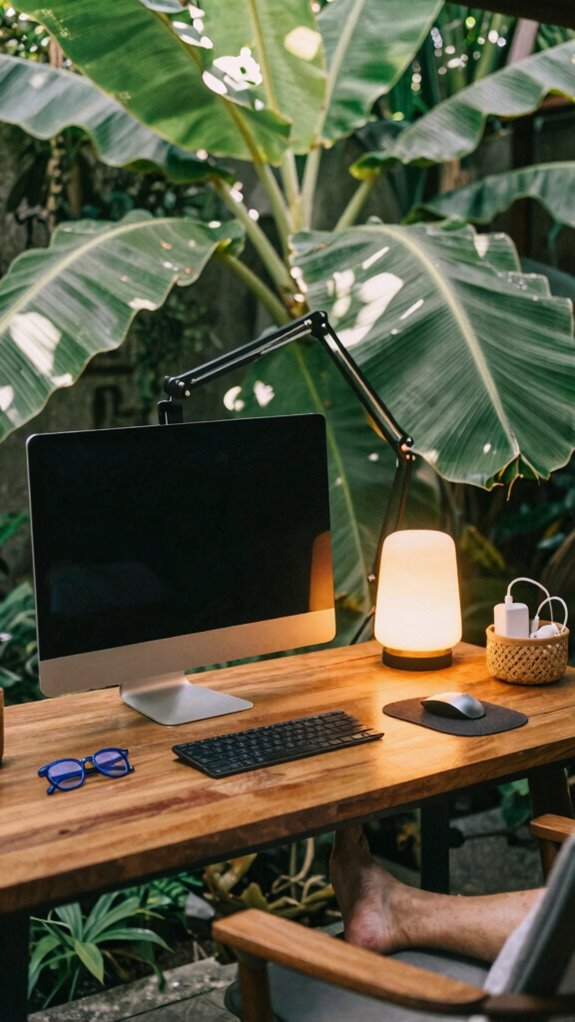
When it comes to staying comfy during those marathon screen sessions, having the right tools isn’t just a luxury — it’s survival gear.
Keep in mind those old desk setups, with a tiny monitor and shaky lamp? Yeah, that’s primitive. Now, gear up with:
- Adjustable monitor arms—fine-tune your screen height; no more neck cramps pretending you’re a yoga master.
- Blue-light glasses—block those digital dangers, and look like you mean business.
- Matte screen filters—say adios to glare, and don’t let reflections sabotage your focus.
- Luma lamps with dimmers—create a cozy atmosphere, avoiding hospital-like lighting.
- Ergonomic footrests—your feet aren’t meant to hang; they’re part of your power move.
- Organizing small gear—efficient storage solutions can help keep your workspace clutter-free and enhance your focus, making small gear organization a key element of a productive setup.
Want to conquer Bali’s co-working scene? Equip yourself, sharpen your edge, and leave cubicle zombies in the dust.
Effective Break Routines to Relieve Eye Fatigue
After slogging through hours at the screen and feeling that familiar eye-fog creeping in, it’s time to hit pause — not just a quick blink, but a real breather. You’ve probably been “hustling” like Michael Scott, but your eyes aren’t buying it.
Here’s the power move: every 20 minutes, look away at something 20 feet away for 20 seconds. Simple, right? Nope, not just eye candy — it’s a game-changer.
Roll your eyes in circles, blink like you’re trying to flood your dry eyes, or shift focus between your monitor and a distant view (hello, outdoor Bali scenes). Incorporating screen time management techniques can further protect your eyes from strain.
Recall that time old boss Dave scoffed at breaks? Now he’s stuck eyeing the screen in his basement.
Break smart — your eyes and reputation will thank you.
Lifestyle Habits and Nutrition to Support Long-Term Eye Health
Switching to a healthier lifestyle mightn’t seem as sexy as upgrading your tech setup, but trust me, your eyes will thank you later.
Back in my cubicle days, I ignored nutrition and paid the price—dry eyes, fatigue, the whole dystopian scene.
Now? I fuel my eyes with real power:
- Omega-3s from fish like salmon or walnuts—nature’s own eye armor
- Antioxidants from colorful fruits and veggies—think berries, spinach, carrots—battle free radicals like a boss
- Hydration—sip smart, not just coffee or fizzy drinks; your eyes are thirsty soldiers
- Vitamin A and C—supplements if you’re skipping greens (seriously, don’t be that person)
- Limited screen time outside—get fresh air, reduce digital overload, and boost your natural circadian rhythm
Want to be a true tech titan? Feed your eyes what they crave.
How to Track and Maintain Healthy Eyes While Working Remotely

Keeping tabs on your eye health while working remotely isn’t about obsessing over every blink—though, honestly, do that if it helps—but about smart, deliberate habits you actually keep. Think of it like upgrading your Wi-Fi—consistently maintaining your connection’s strength matters.
Use visual cues like setting alarms with apps—yes, the “EyeCare 20.20.20” or just your phone—to remind you to take a breather. Check your workspace: Is your screen at eye level? Can you see the natural light peeking through? Incorporate regular stretching routines into your day to reduce any tension that might contribute to eye strain or discomfort—because your eyes aren’t gonna fix themselves if you forget. Maintaining proper ergonomic setup is also essential for preventing strain and supporting overall eye health during extended computer use.
Eye Exercises For Screen Users
If you’ve ever caught yourself staring so long at your screen that your eyeballs felt like they’d pop out, then you’re not alone—trust me, I’ve been there. Back in the cubicle hell days, I’d just grit my teeth, power through, and ignore the headaches.
If your eyes feel like they’re about to pop after endless screen time, you’re not alone—been there, suffered that.
Now, as Bali’s digital nomad, I’ve embraced eye workouts that actually work.
Try these powerhouse moves:
- Palming: Cover eyes with warm palms, breathe deep—instant zen for tired muscles.
- Eye Rolling: Full circles in every direction—stretch, relax, repeat.
- Blink Drill: Rapid blinks to refresh tears and banish dryness.
- Focus Shifting: Switch from screen to distant mountain (or neighbor’s Wi-Fi mast).
- Figure-Eight: Trace an 8 sideways, flex those eye muscles for maximum agility.
Own your vision—don’t let your eyes phone it in like the office drones.
Premium Blue Light Glasses
Ever wonder why your eyes feel like they’ve been through a boxing match after a few hours staring at screens? Welcome to the power move: premium blue light glasses. These bad boys aren’t just fashion accessories (though, yeah, they look sleek). They block the harsh blue rays from digital devices—think of them as your personal shields against eye fatigue and digital hangovers.
Recall that time old boss kept squinting during late-night Zoom marathons? Same problem. Properly chosen, they filter ultraviolet, reduce glare, and keep your eye muscles from cramping up like you’re desperately trying to click “Reply All.” Slip them on, and you’ll notice fewer headaches, sharper focus, all while your eyes stay ready for the next remote sprint. Using effective screen glare filters can further enhance your visual comfort, providing an extra layer of protection against harsh light. Additionally, choosing high-quality blue light glasses can improve your overall experience and durability, making them a wise investment for long-term use.
Because, let’s face it, your eyesight’s worth investing in—Bali isn’t just for surfing.
Ergonomic Home Office Setup
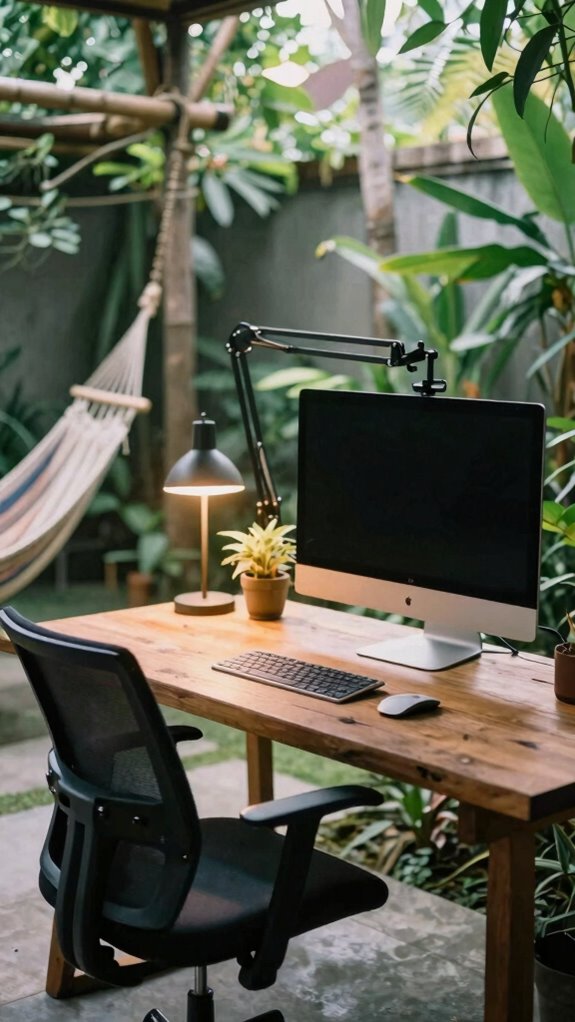
Luxury is overrated, right? Your throne of power starts with an ergonomic setup. Visualize a workspace where your tech operates like a well-oiled machine—no awkward angles, no neck strain.
Ditch luxury; prioritize comfort with ergonomic gear for a powerful, distraction-free workspace.
You wanna look like you’ve got your sh*t together? Here’s the blueprint:
- A VESA-compatible monitor arm, so your screen’s literally at eye level, not cranking your neck like a confused owl.
- An adjustable chair that supports your back’s tightest muscles—no floppy spines here.
- A wireless keyboard and mouse, because dealing with cables is so last decade.
- Proper lighting—think dimmable desk lamps that don’t drown your workspace in glare.
- Dedicated space, no distractions, unlike that chaos behind your old boss Tom’s “open-plan” disaster.
- Think about incorporating cafe architect style elements to make your workspace more inviting and inspiring.
- Taking regular stretch breaks can help prevent strain and keep your body aligned and comfortable during long hours.
Own your space. Command your productivity.
Adjusting Monitor Brightness Regularly
When you’re jumping between Bali’s tropical sunshine and your cozy co-working space, adjusting your monitor brightness isn’t just about making stuff look pretty. It’s about maintaining battle-ready eyes.
Recall how old boss Larry forced us to keep screens blindingly bright, like we were about to launch a rocket? Yeah, that’s a rookie move. During remote work, you need to match your screen’s glow with the room’s ambient light—no more, no less. Proper monitor calibration can enhance your viewing comfort and reduce eye strain.
Use your monitor’s settings or a quick keyboard shortcut to tweak brightness, especially if you walk into a dim zone or get blasted by glaring window light. Keep things balanced.
Why? Because your eyes aren’t made of steel. They’re more like that vintage, slightly flaky laptop they don’t make anymore. Proper lighting for video calls can significantly reduce eye strain.
FAQ
How Can I Tell if My Screen Time Is Harming My Eye Health?
You’ll notice your eyes feeling dry, irritated, or blurry—like a bad Netflix binge gone wrong. Headaches, eye fatigue, or halos around screens? That’s a red flag. Don’t just shrug it off—incorporate breaks, tweak your screen setup, and try blue light blockers.
Recall how Kevin from “The Office” ignored his eyes? Comedy aside, neglecting these signs sneaks up and hits your focus hard.
Time to get serious, my friend.
Are There Specific Foods That Improve Visual Endurance and Eye Clarity?
Your eyes love omega-3 fatty acids found in fatty fish like salmon and sardines — think of it as your eye’s armor.
Carrots, rich in beta-carotene, boost clarity — a nod to old-school lens sharpening.
Add leafy greens like spinach for lutein and zeaxanthin; they’re like eye vitamins.
Want to level up? Snack on almonds, eggs, or blueberries.
Keep in mind, old bosses would kill for a clear vision game—don’t let your screen’s drama ruin it!
What Signs Indicate I Need an Updated Eye Prescription for Screen Work?
You need an update if your eyes feel fatigued, blurry after screen gazes, or if you’re pinching your nose to see better—classic signs your prescription’s gone stale.
Notice headaches, double vision, or constant eye strain? It’s time to hit up your eye doc again. Seriously, don’t ignore those.
Old boss used to joke about “blurry vision” being the 2023 version of a midlife crisis—better get checked before your next Bali surf.
How Does Screen Resolution Impact Eye Strain and Visual Comfort?
Think of your eyes like vintage cameras—resolution is the clarity lens. High-res screens mean sharper images, reducing strain because your eyes don’t have to work overtime decoding blurry pixels.
But if your resolution’s subpar, you’ll squint, feel fatigued, and probably resemble that guy in the office who never upgrades.
Adjust your display settings, go for crisp 4K if possible, and yeah—pick screens with great pixel density.
Power move, right?
Can Regular Eye Exercises Prevent Long-Term Eye Deterioration From Screen Use?
Regular eye exercises can boost your visual resilience, but they won’t stop long-term deterioration alone. Think of them as your eye’s gym session—palming, focusing shifts, quick blinks—keeping muscles limber and blood flowing.
Still, if you don’t fix your crappy ergonomic setup or blink-less stare at screens, it’s like trying to save a sinking ship with just a sponge.
Combine smart habits, fiber-optic routines, and a dash of Bali sunshine for true eye health power.
References
- https://rendia.com/resources/insights/healthy-eye-tips/
- https://www.siouxfallseyedoc.com/2026/03/19/protect-your-eyes-at-work-screen-habits-safety-tips/
- https://www.centreforsight.net/blog/eye-care-tips-for-working-professionals
- https://www.aoa.org/aoa/documents/healthy eyes/digital_eyestrain.pdf
- https://www.cnet.com/health/personal-care/7-tips-to-take-care-of-your-eyes-if-you-work-in-front-of-a-computer-all-day/
- https://prasadnetralaya.com/10-eye-care-tips-for-people-who-use-computers-at-work/
- https://www.youtube.com/watch?v=GF0mZcp64D0
- https://www.guardianlife.com/six-smart-screen-habits-for-better-vision-health
- https://www.sankaranethralaya.org/assets/pdf/oos/improving-visual-health-in-the-digital-age.pdf
- https://dayaleyecentre.in/blog/eye-care-tips-for-working-professionals/