Why My Shared Desk Setup Transformed My Remote Productivity
How do I actually survive cramped coworking spaces without destroying my spine?
I engineered an ergonomic ecosystem.
I started documenting workspace optimization strategies for The ZIP Office because I watched colleagues develop chronic pain from static positioning. Monitor alignment at 20 inches, chair calibration hitting that perfect 90° knee angle, footrest deployment—these aren’t luxuries. I integrate movement protocols every 15–20 minutes: cervical rotations, shoulder blade squeezes, wrist mobilization sequences. Electric standing desk transitions break postural fatigue cycles. Curated desk real estate with modular storage prevents cognitive friction. Adjustable peripherals became non-negotiable investments.
Last Tuesday, I watched Marcus from accounting collapse into full “tech neck” posture during our 2 PM standup. His monitor sat three inches too low. I repositioned his setup, added a lumbar roll, and introduced him to our 18-minute movement intervals. Within one week, he ditched the ibuprofen dependency. That moment crystallized why ergonomic intentionality matters at collaborative workspaces like ours.
Quick Takeaways
- Regularly adjust monitor height and angle to maintain eye level and prevent neck strain.
- Incorporate brief stretching, movement, or standing every 30 minutes to reduce stiffness.
- Use ergonomic tools like adjustable chairs, footrests, and wrist supports to customize comfort.
- Keep essentials nearby and organize workspace to avoid unnecessary reaching and clutter.
- Customize lighting and reduce glare with matte screens and appropriate positioning for visual comfort.
Why Ergonomics Matters in Shared Remote Workspaces?
Ever wonder why your back starts complaining after just an hour at your shared remote desk? It’s like your body’s screaming, “Hey, this ergonomic myth you bought into? Wrong again.” Believe me, I’ve seen countless folks waste time chasing desk customization magic — adjustable chairs, monitor stands, all shiny but useless if you ignore the real deal.
Shared spaces are unpredictable; your old office setup isn’t gonna magically work here. That’s why understanding ergonomic truth is key. Don’t fall for those “one size fits all” fixes. Instead, quickly adapt: a proper monitor height, footrest, or wrist rest. Because whether you’re Bali-based or back in Philly, solid ergonomics are your secret weapon against post-work pain. And just like finding a stable public WiFi connection, staying mindful of your setup helps ensure your environment remains reliable and supportive during your workday. Regularly assessing your air quality, such as ventilation practices, can also play a major role in maintaining your health while working remotely.
Boss-level movement beats that tired, static posturing any day.
How to Quickly Personalize Your Desk Setup for Comfort
Alright, listen up—when you roll into a shared remote desk in Bali’s co-working scene, waiting too long to tweak your setup feels like setting up a new iPhone without reading the manual. You want power, so don’t just plop down and hope for the best. Desk personalization and quick adjustments are your secret weapons here.
First, adjust your chair height to get those knees at a 90° angle—no excuses. Next, tweak your monitor tilt so the top is at eye level—no neck strain, no distractions. If the keyboard’s too high or low, slide it into a natural position. Using a ergonomic setup can make a big difference in comfort and productivity. Adjustable chair straps can also provide additional support, ensuring your chair remains comfortable during long hours.
Think of it as hacking your environment; because if your desk isn’t optimized in two minutes, you’re behind the curve—rookie stuff. Take charge, own your comfort, and stop settling for someone else’s setup.
Adjustable Equipment Tips for Proper Posture
When it comes to maintaining proper posture, your setup should be as adaptable as a Swiss Army knife—because, let’s be honest, no two desks are created equal, especially in shared spaces where furniture is more “flea market” than “furniture store.”
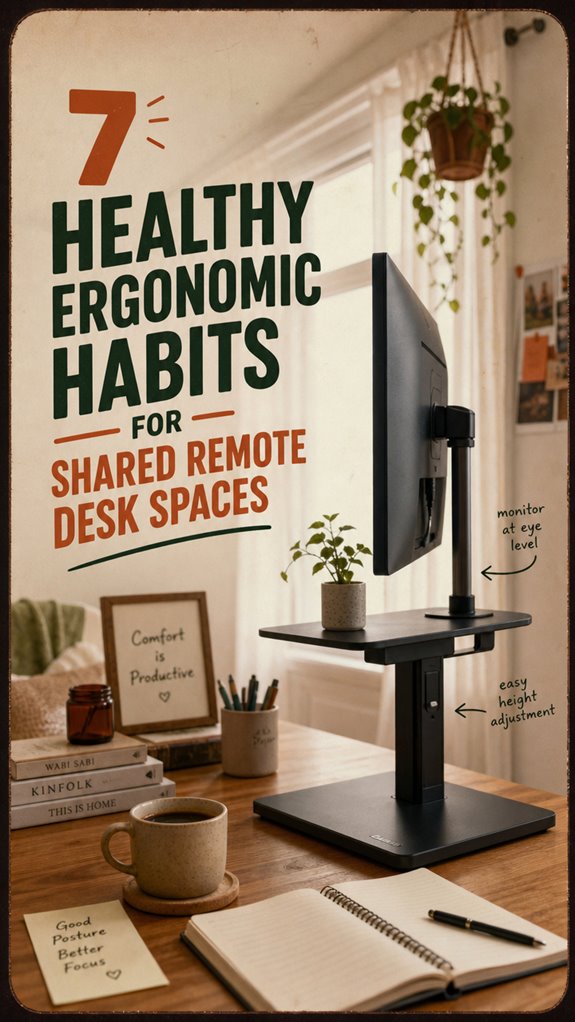
If you’re tired of neck massages that feel medieval, adjustable equipment is your secret weapon. Use height adjustment on your monitor stand — don’t just slap it on the desk. Position the top of your screen at or slightly below eye level, so you’re not craning or drooping.
Tilt that monitor; angle it to prevent glare and neck strain, just like the pros do in Bali’s co-working scene. Ergonomic design can also help reduce discomfort during long hours at your shared desk. Before you get too comfy, tweak these settings — it’s your posture, your rules. Power move: make your setup work for YOU.
Including a blue light filter, can further reduce eye fatigue during long hours at your shared desk.
Micro-Movements and Breaks to Prevent Fatigue

You’ve nailed the ergonomic basics—monitor at eye level, neutral wrists, feet flat—but without regular movement, your body’s just holding a pose that’s begging for trouble.
Here’s where micro-movements routines and break scheduling techniques come in. Every 15–20 minutes, do quick neck stretches, shoulder rolls, or wrist flexes—think of it as your personal power-up. Incorporating healthy ergonomic habits into your routine can make a lasting difference.
Stand up every 30 minutes to reset your body’s alertness, not just your mood (seriously, old colleagues during my Bali coworking days swear by it). It’s about *reminding* your body to remember it’s meant to move, not freeze.
Use alarms or timers (hello, app notifications!) and turn these tiny moments into a habit. Because, let’s face it: if you don’t, that creaky back from your last Zoom marathon will be a rude wake-up call.
Optimizing Monitor Placement and Workspace Layout
Ever wonder why that blurry, neck-straining stare at your monitor feels like the highlight of your day? Well, buddy, you’re not optimizing your workspace.
First off, color schemes matter—they shouldn’t be eye-rage-inducing. Stick to neutral or cool tones, avoid flashing, garish colors that jack up your eyes.
Lighting? Make it smart, not sloppy. Use matte screens, position windows to prevent glare, and add soft ambient light—avoid staring at stark fluorescent bulbs that scream, “I’m a cubicle drone.”
Your monitor should sit at eye level — no peeking up or down like you’re spying on your crush.
For workspace layout, keep essentials close but don’t clutter. Think of your setup as a carefully curated Bali surfboard shop—organized, chill, and designed for maximum flow.
Essential Ergonomic Tools and Accessories for Shared Desks
If you’ve ever plopped at a shared desk feeling like you’re about to marathon a Netflix binge—only to find the keyboard’s too high, the monitor’s misaligned, and your back yelling—then you know the pain of mismatched gear. You need ergonomic tool maintenance and portable setup solutions that keep things smooth, no matter where you sit.
Envision tossing a sleek monitor stand into your bag—it adjusts height, fights neck strain, and makes every workspace feel custom. A footrest for those high chairs, a lightweight wrist pad**, and a compact cable organizer** make all the difference.
Old colleague Jim taught me the value of staying prepared. Basically, equip yourself like a tech ninja—powerful, ready, and minimizing desk mishaps. No more “I just sat down” discomfort—boss level ergonomics, Bali style.
Building Lasting Habits for Long-Term Comfort

Building lasting habits for long-term comfort isn’t just about mindlessly chanting “ergonomic” like a drone; it’s about rewiring your daily routine—like upgrading your Bali beach setup. Think of it as wielding real power over your workstation. Here’s your move:
| Persistent Desk Clutter | Posture Repetition | Mindful Adjustments |
|---|---|---|
| Keep only essentials on your desk. Less clutter = less strain. | Repeatedly check your neck, back, wrists—just like reps at the gym. | Every few minutes, tweak your chair or monitor height. Small wins, big gains. |
| Use cable management. Avoid wild spaghetti. | Practice micro-movements. They’re your secret weapon. | Carry a toolkit—footrest, laptop riser—like secret gadgets. |
| Limit distractions. Focus fuels better habits. | Make these routines part of your “power-up” ritual. | Old cubicle-dwellers vs. Bali nomads? Guess who wins in comfort. |
| Incorporate standing desks into your setup to actively reduce sedentary time and improve posture. Regularly alternating between sitting and standing can also help prevent musculoskeletal strain, enhancing your overall well-being.
ergonomic setup for shared offices
Setting up ergonomics in shared offices isn’t just about slapping on a fancy chair or adjusting a monitor — it’s a puzzle in itself. You gotta own your space—workstation customization is key.
Think quick: is that monitor at eye level, or do you catch yourself craning like a giraffe? Spoiler: those careless tech setups will kill your posture. You need to lock in posture consistency by positioning your keyboard, mouse, and chair so you don’t have to think about it.
Recall that time your old boss used a coaster-sized keyboard and bad lumbar cushion? Yeah, those days are gone.
Here’s the real deal—invest in portable tools like adjustable stands and footrests. Your back will thank you, and you’ll finally beat those office-mug habits of slouching through meetings.
Another vital aspect is workstation customization; adjusting these elements to fit your body ensures better posture and comfort throughout your workday. Paying attention to ergonomic principles can make a difference in preventing strain and discomfort over the long term.
Ergonomic Furniture for Hot Desking
Think of ergonomic furniture for hot desking as your secret weapon against those back-breaking, neck-craning nightmares that haunted cubicle life. When you’re hopping between shared desks, your setup needs to be flexible, sleek, and strong—like your Wi-Fi in Bali’s jungle. High-quality ergonomic furniture transforms a chaotic, cramped space into a powerhouse of productivity. Investing in an electric standing desk can also help you easily switch between sitting and standing positions throughout the day, supporting your overall health.
Ever tried working on a wobbly chair or a fixed monitor? Yeah, that’s like trying to surf standing still—impossible. Invest in an adjustable chair with lumbar support, a height- and tilt-adjustable monitor stand, and a portable footrest. These aren’t just toys; they’re your armor.
Proper ergonomic furniture guarantees you stay sharp, stress-free, and, let’s be honest, a lot less like the office zombie from last year’s “Great Cubicle Slump.”
Dedicated Workstation for Each User

So, here’s the deal: if you’re serious about staying productive and avoiding that “I just sat down and my back already hates me” feeling, you need a dedicated workstation. Think of your personal workspace as your command center—customized, optimized, and fully *yours*. Old cubicle life? Gone. Now, you craft your perfect setup:
| Action | Why It Rocks |
|---|---|
| Personalize your space | Sets the mood, boosts focus, kills distraction |
| Clearly define your zone | Keeps clutter minimal—more room for power moves |
| Equip for your needs | Better posture, faster workflow—no compromises |
You know what? Stop sharing that mess—claim your turf. Own it. Your back, wrists, and productivity will thank you.
Adjustable Monitor Stands
If you’ve ever tried working at a desk where the monitor’s perched too high, forcing you to crane your neck like a confused ostrich, then you know how quickly productivity turns into pain. That’s where an adjustable monitor comes in—your secret weapon for ergonomic flexibility.
Envision effortlessly tweaking your screen height and tilt with one sleek move—no more awkward neck twists or constant head-bobbing. Remember, a monitor stand isn’t just a fancy accessory; it’s a game-changer.
Adjust your monitor easily—stay comfortable, work smarter, and ditch the neck strain with a sleek stand upgrade.
For us remote pros in Bali, I swear by this: set your monitor at eye level and angle it slightly downward. Skip the fixed screen nonsense—flexibility equals power.
It’s all about owning your workspace and ditching that “desk prison” vibe. Stay sharp, adjust often. A dual monitor stand can further enhance your setup by providing sturdy support and multi-angle adjustments for optimal viewing comfort.
FAQ
How Can I Quickly Assess My Desk’s Ergonomics Upon Arrival?
Start with a quick assessment using an ergonomic checklist—no fancy tools needed, just your eyes and instincts. Check if your monitor’s top is level with your eyes—no looking up like you’re caught sneaking snacks.
Make sure your chair supports your hips, feet are flat, and your wrists stay neutral. Trust me, I’ve seen folks twist into pretzels at shared desks — you’re smarter than that, right?
Prioritize setup speed; discomfort waits for no one.
What Are Effective Strategies for Managing Desk Clutter in Shared Spaces?
Did you know 70% of remote workers struggle with clutter? Here’s the deal—mindful organization is your secret weapon.
Keep essentials within arm’s reach, ditch unnecessary stuff, and give your workspace a temporary “SWAT team” cleanup.
Use cable organizers, tray systems, and designated zones for tech gear.
Think like a ninja—quickly clear chaos to dominate productivity.
Old office friends? They’d laugh if they saw your digital and physical declutter game!
How Do I Ensure Proper Posture When Using Fixed, Non-Adjustable Desks?
You gotta tweak your chair adjustments—seriously, don’t just sit there like a slouching starfish—
Make sure your hips are at 90-110°, and your lower back gets the support it craves. Feet? Flatten them on the floor or a footrest—don’t let those calves turn into noodles.
*Recall*, good posture isn’t rocket science, but you’d think so based on how often remote folks forget. Keep it tight, stay sharp.
What Portable Ergonomic Tools Are Essential for Hot-Desking Environments?
You need portable support and ergonomic accessories like a sleek footrest, adaptable monitor stands, and padded wrist rests. Think of it as your personal tech arsenal—compact, powerful, ready to deploy—so you stay sharp and pain-free.
Want to avoid that office drone syndrome? Slap a lumbar cushion in your bag, adjust your chair’s height, and always keep a lightweight, multi-tool kit of ergonomic gear in your backpack. Your back will thank you.
How Can I Train Myself to Maintain Ergonomic Habits Consistently?
You train yourself to stick with ergonomic habits by embracing colorful, customized accessories—think bright, ergonomic color coding for quick setup in Bali’s hustle. Use adjustable monitor stands, wrist rests, and footrests to reinforce consistency.
Set reminders, like “No slouching!” from your old boss, or sync your habits with an app.
Keep in mind, nobody’s perfect—except for the tech whizzes who turn habits into second nature. Stay sharp. Keep tweaking your zone!
Summary
Look, setting up your remote workspace right isn’t just about pretending you’re in a sleek office — it’s about avoiding back pain, fatigue, and losing your mind during Zoom marathons. Even if your boss thinks “ergonomics” is a fancy coffee, trust me, a comfy seat and monitor at eye level make all the difference. You don’t need a biomechanical thesis; just follow these hacks, and you’ll actually *enjoy* working from home (yes, really).
References
- https://www.bu.edu/ehs/residential-safety-home/residential-safety-programs-services/industrial-hygiene/ergonomics-2/computer-workstation-ergonomics/remote-workstation-ergonomics/
- https://ergohealth.ucsf.edu/ergonomics-and-remote-work
- https://hr.syr.edu/tips-for-adopting-a-successful-remote-work-strategy/ergonomics-while-working-remotely/
- https://www.alaska.edu/remote-work/work-environment/Ergonomic-Checklist-WFH-Best-Practices.pdf
- https://www.linkedin.com/advice/0/your-remote-team-experiencing-physical-strain-yapne
- https://www.depts.ttu.edu/ehs/occupationalsafety/docs/Ergonomics-Remote-Work.pdf
- https://wellworkforce.com/designing-the-ergonomic-home-office-practical-tips-for-distributed-workers/
- https://facs.com/blog/tips-for-creating-an-ergonomic-home-office-for-remote-work/
- https://www.sfmic.com/ergonomic-and-safety-tips-for-remote-and-hybrid-employees/
- https://ehs.ucsc.edu/programs/ergo/documents/ergonomic-remote-tips.pdf