Safe Vehicle Power Conversion: Keeping Your Remote Setup Alive
How do remote professionals avoid catastrophic power system failures? Respecting voltage thresholds—exceeding 30V AC or 60V DC triggers electrocution risk.
I write to The ZIP Office because our distributed team relies on bulletproof power infrastructure. Last March in Ubud, I tested my 3000W inverter with a CAT III multimeter, wearing insulated gloves. Proper battery isolation, weatherproof solar optimization, and routine voltage audits transformed my fragile setup into a resilient energy ecosystem. Details matter—they’re the difference between functioning remotely and becoming a cautionary tale.
Last Tuesday, my colleague Marcus nearly fried his MacBook Pro through improper DC disconnection. He’d ripped wires without isolating his lithium battery bank first. That single oversight—skipping the isolation protocol—nearly cost him $2,400. Now we ritualize disconnect procedures. His mistake became our team’s operating standard, proving that complacency kills remote productivity faster than dead batteries.
Quick Takeaways
- Always verify voltage levels with a CAT III multimeter before connecting or powering devices.
- Use insulated tools and PPE, including gloves, when handling high-voltage components.
- Choose inverter and battery systems rated for your device’s power requirements to prevent overload.
- Disconnect power sources before servicing or reconfiguring battery modules or wiring.
- Follow manufacturer guidelines and safety protocols to avoid electrical hazards during power conversions.
Understanding High Voltage Safety Thresholds in Vehicles
Alright, so here’s the deal—if you’re messing with vehicle electrics, knowing where the “danger zone” is can save your fingers, your face, and maybe even your life.
Ever thought about how high voltage is like the untouchable boss of the car world? Anything over 30V AC or 60V DC is on its radar, turning your workbench into a potential death trap.
FMVSS 305? That’s the bible, setting rules to keep you safe from getting electrocuted like a scene out of a bad tech horror movie. Understanding high voltage safety thresholds is essential to avoid accidental contact with dangerous voltages, which is why respecting these limits can make a big difference. Keep in mind those endless Zoom calls with old colleagues boasting about “powering through” without proper gear? Yeah—don’t be that guy. Always verify voltage, respect the thresholds, and treat high voltage like the swaggering villain it really is.
What PPE Do You Need for Safe Power Conversion?
When you’re fiddling with vehicle power setups, just eyeballing the wires and jumping in like it’s a backyard project isn’t going to cut it—especially with high voltage floating around. You gotta gear up, buddy. Think of PPE like your “geek armor”: it’s all about safety first, power second.
Here’s what you need:
| PPE Type | Why It Matters |
|---|---|
| Class 0 Insulated Gloves | They keep shocks in check when handling energized stuff. |
| Insulated Tools | No shortcuts: use tools with proper insulation, or risk a zap. |
| Testing Devices (CAT III Multimeter) | Accurate, reliable voltage checks — because guessing isn’t tech. |
| Barrier & Signage | Warn everyone (including your old boss’s voice in your head) ‘Danger! High Voltage.’ |
Additionally, always stay aware of the voltage levels involved to ensure your safety measures are up to par.
How to Isolate Vehicle Power and Verify Voltage Levels
Think of isolating vehicle power like hitting “pause” on an overly dramatic Netflix series before you do anything risky — because trust me, waking up to a real shocker isn’t how you want your Bali remote work myth to end.
First, locate the main battery disconnect or master shut-off switch. Disconnect it, and pull the negative terminal—don’t just peek at it, actually yank it out.
Ever tried to troubleshoot a computer without unplugging it? Same energy.
Then, grab your trusty CAT III multimeter — no, not that old, sticky one from college. Test the voltage on the circuits; it should read zero or be dead.
When you’re confident, double-check with a second multimeter because nothing kills the vibe faster than a silent, dangerous surprise.
Remember, understanding safe vehicle power conversion practices is essential to ensure you’re not caught off guard by residual voltage or unexpected power flow. Additionally, it’s crucial to be aware of voltage verification techniques to confirm the circuit’s status before working on it.
Safety first, my remote-savvy friend.
Using Insulated Tools and PPE Correctly During High-Voltage Work
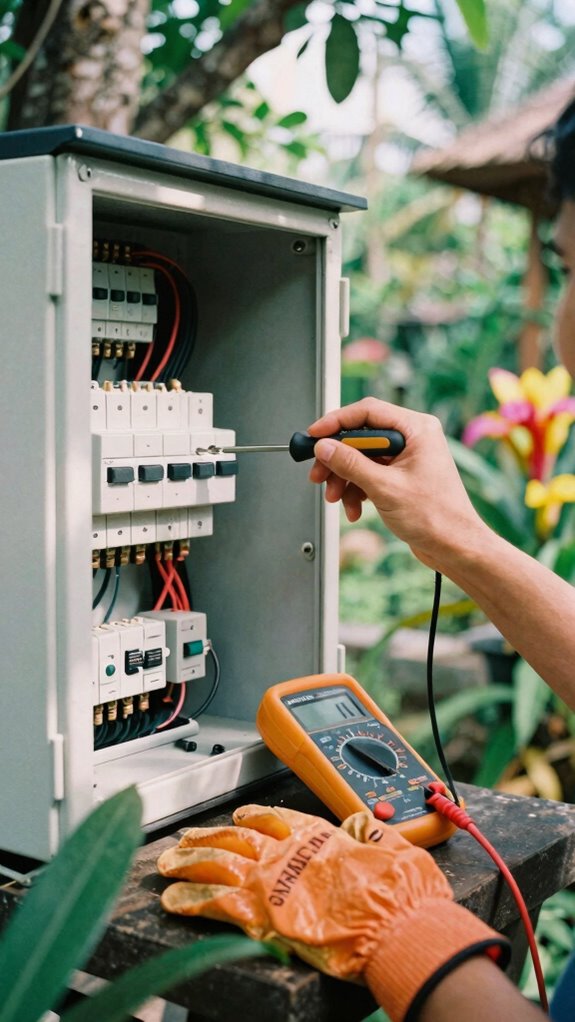
Using insulated tools and PPE properly during high-voltage work isn’t just about checking a box or feeling like you’ve done your due diligence — it’s about truly staying safe while you tinker with those dangerous currents.
As an IT guy set up in Bali’s co-working scene, I’ve learned the hard way that underestimating high voltage can turn your sunny day into a fiery mess. Ever grabbed a tool without considering insulation? Yeah, bad idea.
Always wear Class 0 gloves — they’re your first line of defense against electric fury. Use insulated screwdrivers and pliers, especially when working on energized modules. Best water level sensors can help monitor leakage or flooding risks that might lead to short circuits, emphasizing the importance of proper safety measures. And don’t skip testing with your CAT III multimeter first! Incorporating proper stretching routines into your safety checks can help maintain focus and reduce the risk of accidental contact.
Keep in mind, in remote power-land, safety isn’t optional — it’s straight-up power. Keep your gear tight, and don’t be that guy who sparks his operation.
How to Safely Disconnect Your Vehicle’s Power System
Alright, before you dive headfirst into any vehicle power wizardry, realize this: disconnecting your car’s power system is like unplugging the mainframe of your digital life—only with sparks and chaos potential.
Think about your old office, where the boss ignored safety — yeah, that energy’s still lurking.
That sneaky office energy still hanging around, waiting to catch you off guard.
First, turn off the ignition—don’t be ‘that guy’ who yanks cables while still plugged in.
Next, isolate the main power—remove the negative terminal of your battery like you’re deleting that embarrassing email from high school.
Use your insulated gloves, and double-check with your multimeter that no juice is flowing; I mean, this isn’t a game of digital cherry-picking.
Always have a buddy, or at least a Slack message for backup.
Safety isn’t optional, folks; it’s the key to keeping the remote grind alive.
How to Split and Handle Battery Modules Safely
Handling a big, fat battery pack can feel like trying to tame a wild beast—fascinating but downright dangerous if you don’t know what you’re doing. Recall those days back in the office, where “safety first” was just a buzzer? Well, now’s your turn.
Before splitting a battery module, power down everything, disconnect the main, and remove the negative terminal—think of it as locking the beast in a cage. Use insulated gloves, and grab insulated tools—nothing like a classic “hot-wiring” disaster to ruin your day. It’s also crucial to understand the importance of safe handling techniques, especially when working with large battery modules.
Break the pack into smaller, manageable chunks—don’t yank on a whole beast’s tail. Label everything. Backup plans? Always. Also, ensure you secure stable connections and keep your tools and work area free of conductive materials to prevent accidental shorts.
After, double-check all connections, test voltage, and keep your new modules sealed tight, like securing a top-secret project in a bomb-proof vault.
Installing and Testing Your Inverter and Auxiliary Power Setup

So, you’re ready to get that inverter up and running — and no, it’s not as simple as just plugging and praying. Recall those days in the office, staring at setups that screamed “temporarily doomed”?
Well, now’s your moment to do it right. First, disconnect the main battery to avoid sparks that could turn your vehicle into a firework display.
Mount the inverter in a ventilated spot — no one wants melted wires or hot glue gun chaos. Connect the positive and negative terminals carefully with insulated tools, double-checking polarity — yes, even during these epic remote moments. Proper safety procedures are essential to prevent accidents and ensure a reliable setup.
Power it up with a voltage tester (CAT III, of course). Test again, then test some more. Because, in this game, even one slip-up can turn your remote paradise into a hardware horror show.
Additionally, consider portable lumbar support to ensure comfort during extended setup or testing sessions, especially if you find yourself seated for long periods.
How to Perform Safety and Functionality Checks After Conversion
Think back to that time at the office when Bob forgot to power down before pulling wires; lessons learned, right? Now’s your turn.
First, unplug everything, then use your CAT III multimeter to verify voltage levels — no surprises, no sparks, just pure power.
Double-check your isolation and insulation — trust me, you don’t want live wires playing hide-and-seek. Proper insulation ensures safety and prevents damage, especially when working with USB-C charging cables.
Test your system with power running but at low load. If it blinks or whines, halt.
Ensuring proper security measures, like using top Kensington Lock Cables, helps prevent unauthorized access and potential damage.
Precise, thorough, confident — that’s how you keep your mobile empire running smooth and safe.
Troubleshooting Common Vehicle Power Conversion Issues
When your customized power setup refuses to cooperate, it feels like you’re back in that never-ending office meeting, except this time, your boss is a stubborn inverter. Ever dealt with that? You double-check connections, but nada.
First, verify your voltage—are you still under the high-voltage threshold? Maybe a loose terminal or frayed wire is causing chaos. Grab your CAT III multimeter, and test each circuit; don’t guess.
If readings spike or vanish, isolate the faulty module or connection. Sometimes, a simple reset can fix it—turn off, disconnect, then reboot.
Still no joy? It’s probably deeper—bad relay, blown fuse, or faulty inverter. Document these mishaps; old bosses love to see the mess you turned into progress. Additionally, selecting the right balance board woods for your equipment can enhance stability and reduce vibrations that might lead to electrical issues.
Stay sharp, troubleshoot smart, and keep the power flowing.
How to Document and Report Power Conversion Faults

Alright, let’s get real—tracking down faults in your power conversion system isn’t about rote checklist ticking. It’s about smart documentation that saves your bacon later. When you notice something off—say, a sudden power drop or weird noise—write it down immediately. Include what you saw, heard, and felt, like “voltage spike at 14.5V” or “dashboard warning flashes.” Snap photos or videos as proof—it’s like giving your future self a cheat sheet.
Keep a fault log, listing date, time, what happened, and any steps you took. Share this with your remote crew or supplier—better to have records than a “he said, she said” tech drama. Think of it as your power system’s diary, minus the teenage angst. Proper fault documentation can help identify patterns and prevent future issues. Maintaining comprehensive records also assists in diagnosing issues quickly, especially when dealing with off-grid batteries or mismatched components.
- Record voltage readings and anomalies
- Date and time every fault occurrence
- Take clear photos or videos
- Document corrective actions taken
Using Inverters For Mobile Work
Ever tried powering your laptop on a lawless mountaintop or deep in the jungle, only to realize your car’s cigarette lighter just isn’t cutting it? Welcome to the remote working rebellion!
Inverter magic transforms that 12V cigarette socket into a full-on, home-office-capable AC outlet. First, choose a DC-to-AC inverter rated for your gear’s power needs—think of it as your digital lifeline. Plug it into your vehicle’s power port, switch it on, and voilà—instant elec-charged freedom.
But don’t forget safety: verify your inverter’s wattage, keep your gloves handy, and never operate solo (because Murphy’s law, right?).
When selecting an inverter, consider top gas-powered inverters for reliable, consistent power supply in remote settings. With the right inverter, you’re running the show—no sagging Wi-Fi here, just pure, silent, off-grid powerhouse.
Portable Solar Chargers
Think about the last time you fretted over running out of juice in your laptop while deep into a Bali surf session or mid-hike somewhere only palm trees and regrets up to your waist. Yeah, been there, done that — and it’s a nightmare. That’s where portable solar chargers become your new best friends. They soak up sunlight faster than your old boss’s sarcasm at the water cooler.
Missing power in paradise? Solar chargers soak up sun faster than your boss’s sarcasm—stay connected anywhere.
Want the power, right? Here’s the deal:
- High-efficiency panels: Maximize sunlight absorption so you’re not waiting for months to charge.
- Fast charging ports: Guarantee rapid power delivery to your devices.
- Durability: Look for rugged materials that survive monsoon humidity or accidental drops.
- Compact design: Fits in your backpack, not a museum exhibit.
For optimal performance, ensure your solar charger has solar panel efficiency that converts sunlight into electricity effectively. A good understanding of solar technology can help you make smarter choices when selecting the right portable charger. Forget the power banks — solar’s the future, my friend. Power on!
Mobile Power Mastery

When you’re miles from the grid, sitting in Bali’s sun-drenched co-working space, and your laptop starts blinking that little low-battery warning, it’s a moment of truth.
Time to release your mobile power mastery.
You need a solid plan — think inverter setups, portable batteries, and some serious PPE.
Considering the importance of professional goal journals, having a clear plan for managing your power needs can boost your efficiency during remote work.
To ensure your cables handle the high-speed data transfer, opt for quality connections that prevent disruptions and safeguard your devices.
Hook up a good DC-to-AC inverter to your vehicle’s cigarette lighter or deep-cycle battery; plug in your laptop, and voilà — instant off-grid power.
Toss in a portable power station, because human error happening on the job is real. Oh, and make sure you’re wearing Class 0 gloves when tinkering with high-voltage stuff— safety first, always.
Recall, real remote pros plan for power failure like it’s the final boss.
Stay charged.
Stay cool.
On-Board Vehicle Battery Systems
- Check Battery Health: Use a multimeter to test voltage—anything below 12.6V? Time for a swap.
- Upgrade to Deep-Cycle Batteries: Lithium or AGM, so you can run gear multiple days without turbocharging.
- Isolate & Protect: Install smart isolators to prevent drain while parked—no surprise dead batteries! Additionally, selecting the right smart battery chargers can ensure your battery is maintained properly, reducing the risk of damage.
- Follow OEM 101: Always stick to manufacturer instructions—trust me, old colleagues’ mistakes are legends.
- Monitor Battery Performance: Regularly neural links can help optimize your battery management and prolong the life of your system.
FAQ
What Are the Signs of High-Voltage System Failure or Danger in Vehicles?
You’ll know a high-voltage system is toast if you see sparks flying, hear electrifying pops, or smell burnt plastic—like your vehicle just went supernova.
Warning signs include flickering dashboards, warning lights, or potential shocks when poking around.
If you notice odd behaviors, stop immediately, disconnect power, and don’t mess around; even the old boss from Bali would agree—safety isn’t optional when dealing with this kind of juice.
How Often Should High-Voltage Systems Be Inspected or Tested During Conversions?
You should test high-voltage systems every 6 months—yeah, twice a year! Think of it as giving your vehicle a health checkup, like the old days at that cubicle farm, but way cooler.
Use your CAT III multimeter and inspect all connectors, cables, and insulation.
Keep in mind that one time old Steve ignored his system, and boom—fire alarm. Don’t be Steve.
Keep it tight, keep it safe, and stay ahead of failure.
Are There Specific Training Requirements for High-Voltage Vehicle Power Work?
You need formal high-voltage training, like the kind that leaves your hair standing on end—literally. Think you’re just tech-savvy? Nah, mastering PPE, circuits, and safety protocols means hands-on classes from certified pros.
Envision this: one slip and you’re rewriting your legal will. Don’t be that guy at the Bali co-working, pretending “I got this,” after binge-watching DIY videos.
Get serious, get trained, or risk frying more than just your ego.
What Legal Standards Govern Vehicle Power Conversions in Different Regions?
Absolutely, laws differ worldwide. In the US, FMVSS 305 dictates safety in vehicle modifications, while Europe’s EN standards demand CE compliance and rigorous testing. You’d think this was rocket science, not just powering a laptop, right?
Always check with local authorities — don’t get caught turning your van into a lithium-powered, fire-starting torch. Keep in mind, folks: legality keeps your gear safe, your insurance intact, and social media from roasting you.
How Can You Safely Handle Unknown or Undocumented Vehicle Power Systems?
Visualize drilling into an unknown van’s wiring without a clue—you’re asking for trouble. To play it safe, Always verify voltage with a CAT III multimeter before touching anything.
Disconnect the battery’s negative terminal first, then wear Class 0 insulated gloves.
Use insulated tools, work with a buddy, and document everything like a spy.
Old colleague Steve once fried his setup — lessons learned? Totally.
Stay cautious, stay smart.
References
- https://tide.theimi.org.uk/sites/default/files/2023-12/IMIEV11 -2024 DRAFT v3.pdf
- https://convertingev.com/is-converting-a-car-to-electric-safe-yes-follow-these-tips/
- https://www.youtube.com/watch?v=VLqMGOLmBLI
- https://cdn.asp.events/CLIENT_Nineteen_F7A1E73F_5056_B725_6BE81DEAAC036B43/sites/ETS2025/media/libraries/exhibitor-brochures/72159-CAT1289-Ring-Carnation-Vehicle-Conversion-Catalogue-2019.pdf
- https://medium.com/@chrislorensson/10-tips-remote-working-from-your-car-3b39e06550a5
- https://www.clercscar.com/car/digital-nomad-vehicle-setup-for-remote-work/
- https://toomanyadapters.com/tips-tools-working-from-your-car/
- https://www.youtube.com/watch?v=7ieghMpkErg
- https://www.computerworld.com/article/1613729/how-to-turn-your-car-into-ultimate-mobile-office.html
- https://www.ecoflow.com/us/blog/rv-power-supply-remote-work