Why Remote Work Destroyed My Posture (And How I Fixed It)
Chronic back pain isn’t a badge of honor—it’s a productivity killer.
I’m writing this for The ZIP Office because remote work demands intentional wellness infrastructure, not wishful thinking. After three years practicing geographic arbitrage across Southeast Asia, I learned that standing desks and ergonomic chairs mean nothing without behavioral discipline.
My breakthrough: micro-adjustments every 20 minutes. Screen tilted. Stance rotated. Posture sensors became my accountability partner. Smart wearables tracked alignment. Hydration monitors replaced coffee-fueled dehydration. Quick stretches between Zoom calls kept blood flowing. Small tweaks prevented the cubicle casualties I’d witnessed.
Last month, my eight-year-old watched me collapse after a 6-hour work sprint. He asked, “Dad, why do you sit like that?” His question hit differently. Now we stretch together before breakfast. He holds me accountable. Fatherhood demands I model sustainable work habits.
Quick Takeaways
- Incorporate micro-adjustments and ergonomic tools to maintain proper posture and prevent strain during work sessions.
- Schedule regular active breaks with stretching, walking, and mindful breathing to boost circulation and mental clarity.
- Personalize your workspace with adjustable lighting, monitor positioning, and portable ergonomic gear for maximum comfort.
- Use wearable technology to monitor hydration, posture, and movement patterns for proactive health management.
- Embrace movement-based routines and flexible work setups to promote overall wellness and sustain high performance.
Why Ergonomic Micro-Adjustments Matter for Mobile Professionals
Ever try working on your laptop in Bali’s favorite co-working spot and suddenly realize your neck feels like a taffy pull? Yeah, I’ve been there—drenched in sweat, fighting that creeping pain while everyone else is vibing with their acoustic guitar and surfboards.
Working in Bali, battling neck pain while everyone else surf’s up—tiny posture tweaks make a big difference.
Here’s the thing: micro-adjustments matter, big time. Your wearable posture tech alerts you when your spine’s out of line, even if you’re still pretending to focus. Small tweaks, like tilting your laptop or switching your stance every 20 minutes, cut down those backcrunch moments. Incorporating eronomic micro-adjustments into your routine helps counteract the negative effects of prolonged static postures, which are common when working remotely on the go.
Trust me, after years of being that guy hunched over like a Quasimodo, I swear these tiny habits keep you from becoming a human pretzel. Ergonomic micro-adjustments can prevent discomfort and promote better posture, especially when working remotely on the go.
Make Micro-Adjustments to Stay Comfortable While Moving
When you’re bouncing between Bali’s sunny co-working spots and your sleek portable setup, making micro-adjustments isn’t just helpful—it’s essential. Think of workspace personalization as your secret weapon—tiny tweaks that boost mental focus and keep discomfort at bay.
Recall that time back in the cubicle, hunching over some ancient chair that clearly hated you? Yeah, ditch that vibe. Now, you’re fine-tuning your setup: adjusting your yellow-friendly LED lamp, repositioning your portable monitor, or tweaking your wireless mouse’s angle. Incorporating a height-adjustable desk allows for seamless transitions between sitting and standing to promote better posture.
Little things—like elevating your laptop to eye level or sliding your footrest closer—keep you sharp. Using anti-fatigue floor mats under your standing desk can also significantly reduce fatigue and discomfort during long work sessions. It’s all about making that devilish edge of discomfort disappear, so your brain stays laser-focused and your vibe remains all about high-performance ease, no matter where you roam.
Use Posture Monitoring Devices to Avoid Strain
Have you ever caught yourself slouching so bad that your spine files a formal complaint? Trust me, I’ve been there, lounging in Bali’s co-working scene, regretting my past posture sins.
Enter posture monitoring devices—your new best friends for postural correction and ergonomic adjustments. These gadgets buzz or flash when you slip into bad habits, reminding you to sit up straight or tweak your setup.
Instead of blindly adjusting your laptop height or stacking pillows like it’s a bad DIY project, use tech to keep your form in check. Incorporating top posture correction shirts can provide an additional layer of support for maintaining proper alignment throughout your workday.
Snapping on a smart posture sensor or wearing wearables like a badge of honor helps promote good weather stripping tapes practices. It’s about catching those bad habits before they turn into a full-blown back-ache marathon, for real.
Your back will thank you—you’re welcome.
Take Regular Active Breaks to Recharge and Improve Circulation

Jumping straight from postural patrol to actually moving around is like giving your body that much-needed Wi-Fi boost—it’s a total game-changer. Seriously, think about all those hours glued to your laptop—your circulation’s basically on life support.
So, take legit active breaks—stretch, walk around, shake it off like you’re defragging a sluggish server.
Bonus points? Use mindfulness exercises—focus on your breath, clear your head, and banish that “dead-end code” stress.
Oh, and don’t forget the power of dietary supplements—stuff like magnesium or omega-3s—your secret weapons against burnout.
Just a few minutes away from the screen can reset your brain faster than a fast reboot.
Recall, your body’s not a machine, even if your Wi-Fi says otherwise.
Optimize Your Environment With Wearable Climate Controls
If you’ve ever tried working in Bali’s hot and humid climate, you know dealing with stuffy rooms and sweaty biceps quickly turns into a total grind—unless, that is, you’ve got wearable climate controls keeping your environment so chill you forget you’re on a tropical island. I’ve been there; my old cubicle-in-the-basement days seem like a distant nightmare now.
With climate regulation via sleek wearable tech in your arsenal, you can battle heat or cold on command. Think:
Control your climate on demand with stylish wearable tech—stay cool, focused, and sweat-free wherever you are.
- Personal microclimate jackets with built-in fans or heating pads
- Smart wristbands with real-time air quality feedback
- Bluetooth-enabled neck cooling scarves
- Climate-regulating patches that adapt to your skin
This way, your environment’s micro-boss, not the weather, controls your focus. It’s elite agency—tech-driven, sweat-free, and utterly smooth.
Track Sleep and Recovery to Maintain Peak Performance
Ever wake up feeling like you got hit by a truck, even after what should’ve been “enough” sleep? Yeah, I’ve been there—especially after a late Bali sunset or a quick jet lag fix gone sideways. Tracking your sleep and recovery isn’t just nerdy; it’s your secret weapon for peak performance. Use that sleek fitness ring or smart watch to monitor your rest quality, heart rate, and deep sleep cycles. Strict recovery rituals—like blackout shades, meditation, or gentle stretches—set the stage for real reset. Check your data often and tweak your habits. Here’s a quick chart to keep your sleep hygiene tight:
| Metrics | Recovery Rituals |
|---|---|
| Rest periods | Nightly wind-down |
| REM cycles | Progressive relax |
| Heart rate data | Consistent sleep time |
Incorporate Stress Management and Hydration Tips During Your Day
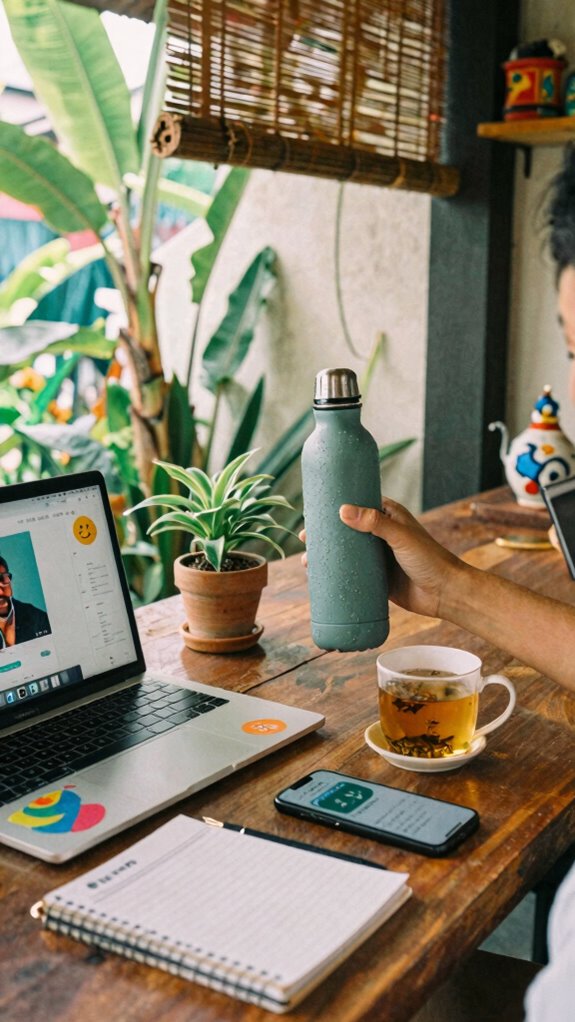
Stressed out, totally dehydrated, and barely holding it together? Been there, done that—especially in Bali’s bustling co-working scene, where juggle mode is the default. Here’s the deal: stress reduction is a game-changer for your sanity, and hydration routines keep that brain sharp. Want real tips?
- Sip water regularly—set alarms on your phone if you forget (because, honestly, who remembers?).
- Incorporate herbal teas or electrolyte drinks, especially if you’ve been deep in code or client calls.
- Practice quick breathwork—inhale for four, hold, then exhale slowly. It’s basically mental reset button.
- Keep a mini hydration pack or water bottle within arm’s reach—no excuses.
- Tracking your daily water intake can help ensure you’re staying properly hydrated throughout your busy day.
Your old office might’ve ignored this—don’t fall into the same trap.
Hydrate, stress less, and stay sane.
The Kinetic Kit Essentials
Alright, let’s talk about the Kinetic Kit essentials—because, trust me, if you’re still schlepping around some cramped apartment dodging nerve-wracking musculoskeletal disasters, you’re missing the true freedom of the modern workspace.
Upgrade your space with portable, ergonomic essentials—embrace movement and banish back pain in style and freedom.
Envision swapping that clunky chair for anti-gravity backpacks, inflatable lumbar supports, and posture sensors that actually *tell* you when you’re losing it. Seriously, your health shouldn’t be an afterthought in your work-life balance.
Incorporate mindfulness practices, like quick stretching or breathwork, right between zoom calls.
Toss in portable footrests and wireless mice to keep your flow smooth.
Recall those old office days, hunched over a dusty desk? Yeah, ditch that.
Today, your mobility setup should empower you to move, breathe, and stay sharp—anywhere, anytime.
Smart Hydration Monitors
You know that feeling when you realize you’ve been sipping coffee instead of actually hydrating all day? Yeah, I’ve been there, too—before I found smart hydration monitors.
These little gadgets don’t just track water intake; they use hydration algorithms to give you real-time feedback. The secret sauce? Sensor calibration that actually works, unlike those cheap wearables that lie more often than your old boss’s excuses. Additionally, selecting reliable data recovery software ensures your health-related data remains secure and recoverable in case of accidental errors.
Here’s the lowdown:
- Sync with your health app, so hydration becomes part of your data brain.
- Use as a hydration coach, not just a fancy wristband.
- Pay attention to sensor calibration — don’t trust it if it’s off.
- Think of it as your personal hydration AI, keeping your electrolyte game tight.
- Consider the importance of hydration tracking devices in maintaining optimal health and performance.
Smart Hydration Monitors With Alerts
Ever wondered if your smart hydration monitor can actually save you from another caffeine-fueled blunder? Trust me, it’s a game-changer—especially if you’re tired of the old “drink more water” advice that, let’s be honest, nobody really follows.
Smart hydration monitors prevent caffeine overdrive and keep your wellness on point — no more guesswork, just smart, real-time hydration.
Hydration technology has come a long way, and these monitors keep your wellness tracking on point without the nagging guilt trip. Many of these devices also incorporate top standing desk stools for comfort and flexibility, making your workspace ergonomics more dynamic and adjustable.
Envision this: you’re knocking out code in Bali’s co-working scene, and suddenly, your alert buzzes. Boom—you’re reminded to hydrate, not just gulp coffee.
Different from old-school hydration habits, these gadgets give you real-time data, so you can tweak your intake on the fly.
No more guessing games—just clean, efficient hydration mastery, keeping you sharp and outpacing those cubicle zombies. Plus, some advanced hydration monitors now feature smart window films, helping you control your environment for better comfort and focus.
The First Sovereign Professional Profile
Think back to your last office gig—those soul-sucking days stuck in a cubicle, frantically fighting for Wi-Fi, and hoping nobody bumped the shared printer.
Now, envision swapping that for your first Sovereign Professional Profile. It’s about tuning your body and mind like a high-performance app. Focus on gait analysis to spot and fix how you move—loops, tension, imbalance—so your steps are smooth and energy-efficient.
Wrist flexibility? That’s your secret weapon for long hours typing or adjusting gear without stiffness or pain.
Some tips:
- Do daily gait checks using simple smartphone apps
- Stretch your wrists every hour
- Use ergonomic gear designed for your unique movement patterns
- Think of your body as deployable infrastructure—customizable to your remote hustle.
FAQ
How Can Remote Professionals Effectively Balance Work and Physical Health on the Go?
You can balance work and physical health by creating an ergonomic workspace wherever you go, maintaining active breaks, and fueling yourself with healthy snacks. These habits keep your body energized and your mind sharp, making mobility seamless and fulfilling.
What Are the Best Strategies for Maintaining Mental Focus in Transient Environments?
Did you know 77% of remote workers report improved focus with mindfulness techniques? Use focus-enhancing tools like noise-canceling headphones or app timers, and practice quick mindfulness exercises to stay grounded and deeply engaged, anywhere you are.
How Do Wearable Devices Integrate With Daily Wellness Routines for Mobile Professionals?
Wearable integration helps you tailor your wellness routines, making them more intimate and effective. By customizing approaches using data from devices like sleep trackers and health monitors, you actively optimize your daily habits for better focus, resilience, and well-being.
What Innovative Tools Support Privacy and Security During Mobile Work Sessions?
You can shield your work with innovative tools like privacy filters and encryption protocols, helping you keep sensitive info under wraps. Think of it as putting your digital guard up, ensuring your private conversations stay just between us.
How Can Professionals Optimize Energy Management Across Different Time Zones?
To optimize energy management across time zones, prioritize sleep and nutrition with Time zone adjustments in mind. Use energy-efficient tools, listen to your body’s signals, and schedule deep work during peak alertness, making adjustments as needed for sustained vigor.